Requirement
Considering the following scenario using Strategy Tutorial project, users may want to implement multiple metric conditions in the report filter where the metric conditions must satisfy the conditions below.
1.Two or more metric are compared with a same value input by user.
Note: Although the value is used to compare with two or more metrics, it will be input only once, as end users don’t want to input same value multiple times.
2. Each comparison operator for each metric comparison can be chosen dynamically
3. Compare expressions are joined by OR/AND logical operator.
The sample in this article demonstrates how to achieve below condition for metric Cost and Profit:
Condition: Cost < 1000,000 OR Profit > 1000,000
Where
To achieve this, follow the steps below:
Content
1. Create a value prompt and named it CompareValue

2. Create an object prompt and named it CompareCostOperator
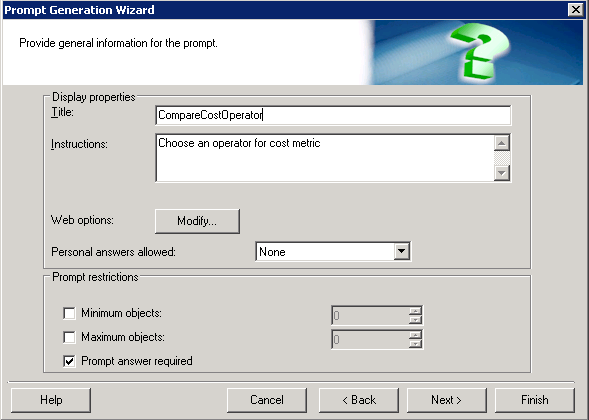
Location of operators: Schema Objects > Functions and Operators > Operators > Comparison Operators
3. Create a metric and name it CompareCostMetric to use metric Cost for comparison:
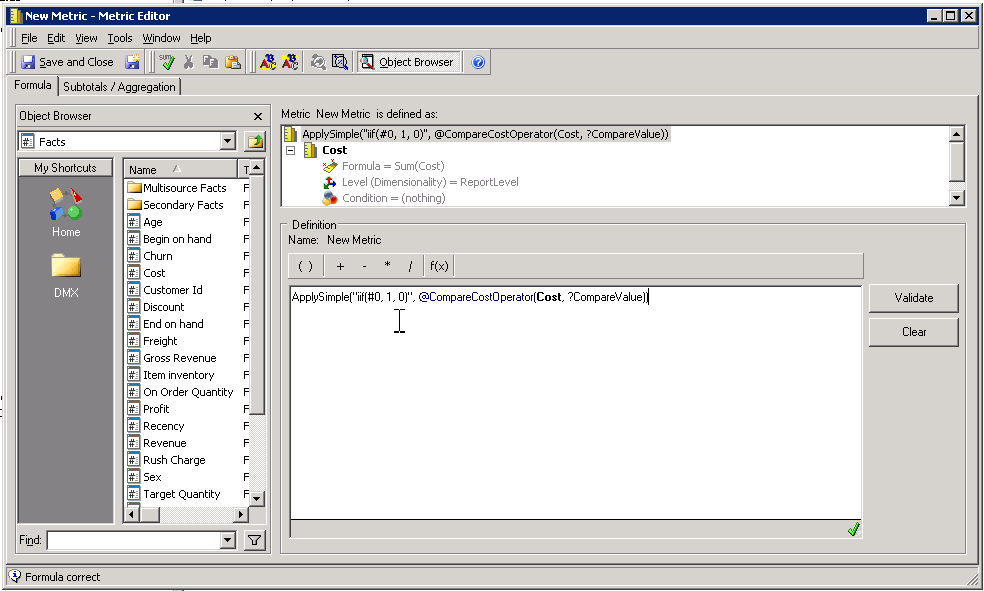
Expression:
ApplySimple("iif(#0, 1, 0)", @CompareCostOperator([Cost], ?CompareValue))
Note:
The expression may vary depending on the database type.
Above example is used for Microsoft Access.
For Oracle Database, it should be:
ApplySimple("case when #0 then 1 else 0 end",@CompareCostOperator([Cost], ?CompareValue))
4. Repeat Step 2 and 3 to create similar objects for another metric, Profit:
Object prompt: CompareProfitOperator
Metric: CompareProfitMetric
5. Create a filter named as CompareFilter, add two customized metrics into it, and set the join logical operator to OR/AND

Note: By setting the metric value exactly equal to 1, it means that the condition expression set in metric is true.
Finally the filter would look like below:

6. Create a report using the filter created in step 5.
Below is how the report would work:


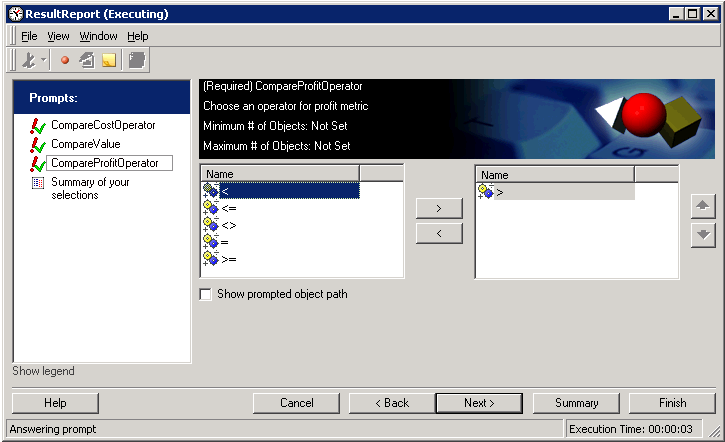


Below is the generated SQL:
select pa11.[CALL_CTR_ID] AS CALL_CTR_ID
from [ZZTF7BS7W26MD000] pa11
where ((iif(pa11.[WJXBFS1] < 1000000.0, 1, 0) = 1.0
or iif(pa11.[WJXBFS2] > 1000000.0, 1, 0) = 1.0))
Article Reference Number: KB440320 KB440320
