EducationSoftwareStrategy.com
StrategyCommunity

Knowledge Base

Product

Community

Knowledge Base

TopicsBrowse ArticlesDeveloper Zone

Product

Download SoftwareProduct DocumentationSecurity Hub

Education

Tutorial VideosSolution GalleryEducation courses

Community

GuidelinesGrandmastersEvents
x_social-icon_white.svglinkedin_social-icon_white.svg
Strategy logoCommunity

© Strategy Inc. All Rights Reserved.

LegalTerms of UsePrivacy Policy
  1. Home
  2. Topics

KB484148: How to decrease the size of MSTR files


Xiwei (Eric) Zhuang

Software Engineer, Senior • MicroStrategy


This article explains why your MSTR file may be very large. This article also provides a solution to reduce the size of your MSTR file.

Starting with the release of Strategy ONE (March 2024), dossiers are also known as dashboards.

Description


An MSTR file is often large due to the large size of datasets within the file. In most cases, a dossier does not use all the dataset objects. You can reduce the size of a large MSTR file by replacing the datasets with new subset reports which contains only the objects used in the dossier.
You can reduce the size of your MSTR file without affecting the original dossier. You should replace the dossier dataset with a new subset report with only the required objects. Then, proceed with the steps under Solutions.

Solution


The following example uses

OriginalFile.mstr 
with the size 1.55 MB.

ka0PW0000001JbtYAE_0EM2R0000019M4q.jpeg
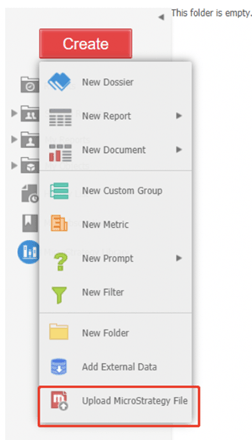
  • Upload the MSTR file to the project and then open the dossier.
ka0PW0000001JbtYAE_0EM2R0000019M50.jpeg
  • Save all the datasets in this dossier as standalone datasets.
ka0PW0000001JbtYAE_0EM2R0000019M55.jpeg
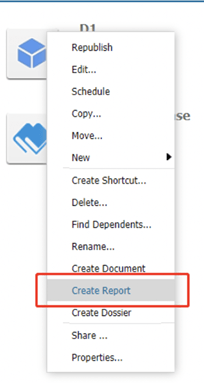
  • Create subset reports based on the newly created cubes.
ka0PW0000001JbtYAE_0EM2R0000019M5A.jpeg
  • Add the objects which are used, or will be used in the dossier, to the subset reports.
  • Save the reports.
  • Rerun the dossier.
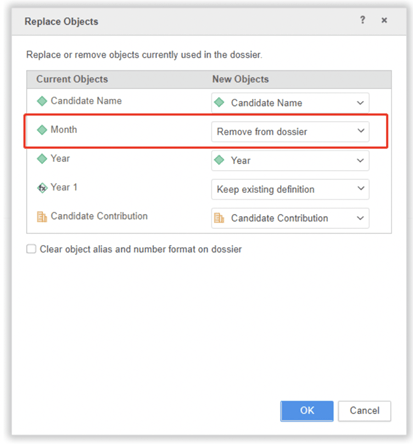
  • Replace the dataset in the dossier with the existing dataset and select the newly created subset report. Remove from dossier should not be selected in the Replace Objects dialog. 
ka0PW0000001JbtYAE_0EM2R0000019M5F.jpeg
  • After replacing the dataset, you can see a decrease in the number of objects in the Datasets panel.
ka0PW0000001JbtYAE_0EM2R0000019M5K.jpeg
  • Save and then download the dossier. The size of the new MSTR file is smaller.
ka0PW0000001JbtYAE_0EM2R0000019M5P.jpeg

Comment

0 comments

Details

Knowledge Article

Published:

March 27, 2020

Last Updated:

March 21, 2024