EducationSoftwareStrategy.com
StrategyCommunity

Knowledge Base

Product

Community

Knowledge Base

TopicsBrowse ArticlesDeveloper Zone

Product

Download SoftwareProduct DocumentationSecurity Hub

Education

Tutorial VideosSolution GalleryEducation courses

Community

GuidelinesGrandmastersEvents
x_social-icon_white.svglinkedin_social-icon_white.svg
Strategy logoCommunity

© Strategy Inc. All Rights Reserved.

LegalTerms of UsePrivacy Policy
  1. Home
  2. Topics

KB439588: How to deny user access to save to the “My Objects” folder in MicroStrategy Web 10.x


Community Admin

• Strategy


This Knowledge Base article how to deny user access to save to the “My Objects” folder in Web.

SYMPTOM:
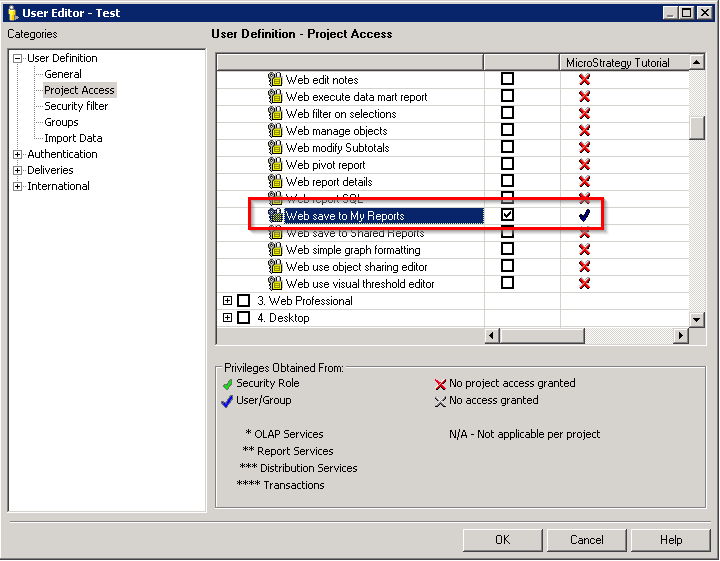
There is no privilege to grant or deny ability to save to the “My Objects” folder in Web. However, there is a privilege to grant or deny ability to save to “My Reports” folder under Web Analyst -> “Web save to My Reports”.
ka04W000000OcMSQA0_0EM44000000YQYS.png

 
CAUSE:
This is expected behavior.  Strategy was not designed to include a privilege for saving to the “My Objects” folder.
WORKAROUND:
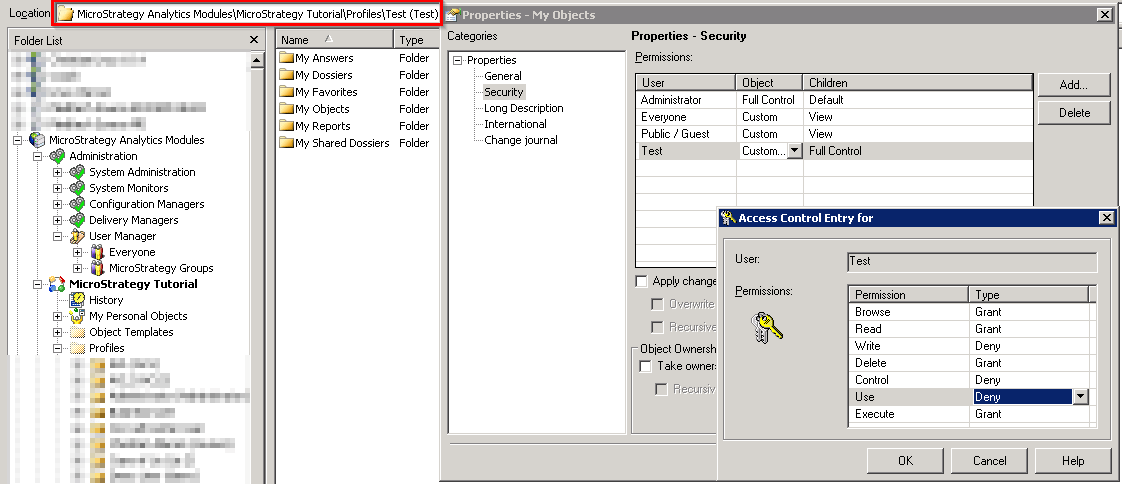
To deny the ability of users to save to the “My Objects” folder, adjust the ACLs for the user under hidden folder Profiles -> User A for the “My Objects” folder. Deny ability to write/control the folder.
ka04W000000OcMSQA0_0EM44000000YQYX.png

KB439588


Comment

0 comments

Details

Knowledge Article

Published:

February 5, 2018

Last Updated:

December 24, 2018