EducationSoftwareStrategy.com
StrategyCommunity

Knowledge Base

Product

Community

Knowledge Base

TopicsBrowse ArticlesDeveloper Zone

Product

Download SoftwareProduct DocumentationSecurity Hub

Education

Tutorial VideosSolution GalleryEducation courses

Community

GuidelinesGrandmastersEvents
x_social-icon_white.svglinkedin_social-icon_white.svg
Strategy logoCommunity

© Strategy Inc. All Rights Reserved.

LegalTerms of UsePrivacy Policy
  1. Home
  2. Topics

KB484202: How to detect the API version in MicroStrategy for Office


Julia Sroka

Consultant • Strategy


This articles describes how to determine the Excel API version being used in your MicroStrategy for Office add-in.

To import objects using the Strategy for Office add-in, you must at least have Excel API version 1.4. 
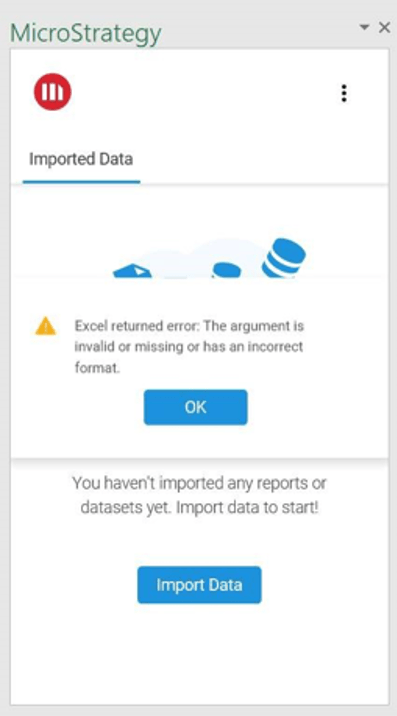
If the Excel API version is unsupported, you may receive the following error:
Excel returned error: The argument is invalid or missing or has an incorrect format. 
ka02R000000g7NzQAI_0EM2R0000019dpQ.jpeg

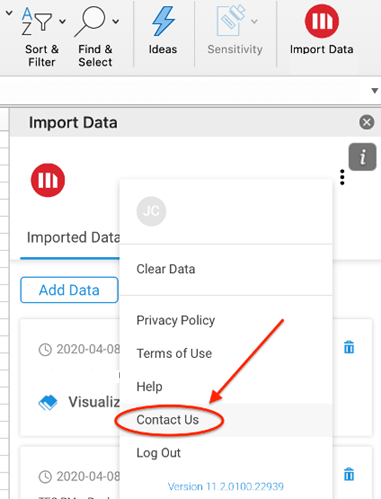
To confirm your API version, click on More Items > Contact Us. 
ka02R000000g7NzQAI_0EM2R0000019dq3.jpeg

An email template appears with the Excel API version being used in your add-in. 


Comment

0 comments

Details

Knowledge Article

Published:

April 21, 2020

Last Updated:

April 21, 2020