EducationSoftwareStrategy.com
StrategyCommunity

Knowledge Base

Product

Community

Knowledge Base

TopicsBrowse ArticlesDeveloper Zone

Product

Download SoftwareProduct DocumentationSecurity Hub

Education

Tutorial VideosSolution GalleryEducation courses

Community

GuidelinesGrandmastersEvents
x_social-icon_white.svglinkedin_social-icon_white.svg
Strategy logoCommunity

© Strategy Inc. All Rights Reserved.

LegalTerms of UsePrivacy Policy
  1. Home
  2. Topics
  3. KB428146: How to determine which DSN is being used by the Intelligence Server on a 64-bit Windows machine

KB428146: How to determine which DSN is being used by the Intelligence Server on a 64-bit Windows machine


Community Admin

• Strategy


SYMPTOM:
A user would like to determine what DSN is used by the Intelligence Server on a 64-bit machine, however the information does not exist in the same registry path as on a 32-bit machine.
CAUSE:
On a 64-bit machine the registry key is held under the WOW6432Node.
ACTION:
Navigate to HKEY_LOCAL_MACHINE -> SOFTWARE -> WOW6432Node ->MicroStrategy -> Datasources -> Castor Server. The DSN is under the "Location" key value
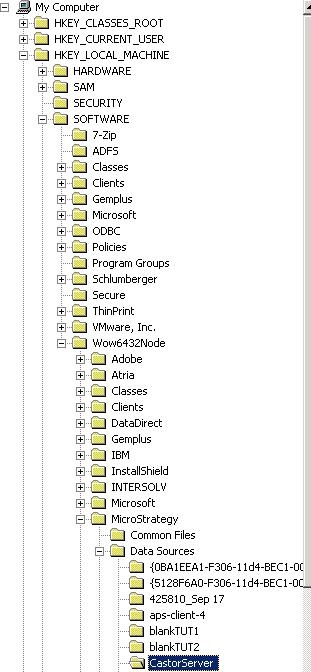
ka04W00000148uSQAQ_0EM440000002WG1.jpeg


Comment

0 comments

Details

Knowledge Article

Published:

November 6, 2017

Last Updated:

November 6, 2017