EducationSoftwareStrategy.com
StrategyCommunity

Knowledge Base

Product

Community

Knowledge Base

TopicsBrowse ArticlesDeveloper Zone

Product

Download SoftwareProduct DocumentationSecurity Hub

Education

Tutorial VideosSolution GalleryEducation courses

Community

GuidelinesGrandmastersEvents
x_social-icon_white.svglinkedin_social-icon_white.svg
Strategy logoCommunity

© Strategy Inc. All Rights Reserved.

LegalTerms of UsePrivacy Policy
  1. Home
  2. Topics

KB484979: How to differentiate geo elements with the same name in maps in MicroStrategy Web 11.x


Mengran (Molly) Wang

Senior Cloud Support Engineer III • MicroStrategy


This article provides steps for modifying the a2.json file to differentiate geo elements with the same in maps.

Starting with the release of Strategy ONE (March 2024), dossiers are also known as dashboards.

Description

When using maps in Strategy Web 11.x, you may find the same names in the same geo level, for example Semarang Regency and Semarang City in Indonesia. In out-of-the-box Mapbox and ESRI maps, they are not differentiated. 
 

Solution


Modify the names of the two different locations. 

  • Search in
    C:\Program Files (x86)\MicroStrategy\Web ASPx\WEB-INF\xml\maps\lookupTables\a2.json
    . This file lists the international cities where two Semarangs are found. 
    "IDA23374":{"name":"Semarang","parent_0":"ID","parent_1":"IDA133","bounds":[110.269,-7.115,110.507,-6.935]}

    "IDA23322":{"name":"Semarang","parent_0":"ID","parent_1":"IDA133","bounds":[110.25,-7.497,110.661,-7.079]}
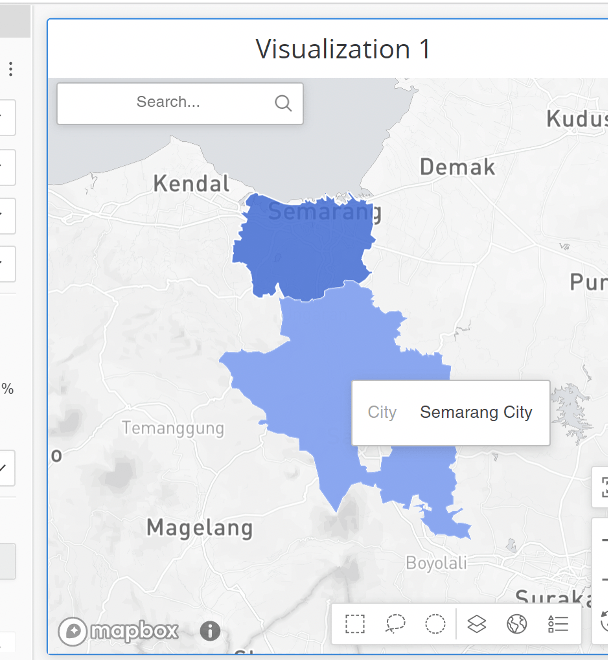
  • Modify the names to be Semarang City and Semarang Regency to differentiate them. In the dossier, one should show as City and the other as Regency.
ka0PW0000001JflYAE_0EM4W0000027Oma.jpeg
  • Please note that this is a customized file and should be treated as a plugin, meaning it should be backed up before upgrading.

Comment

0 comments

Details

Knowledge Article

Published:

April 12, 2021

Last Updated:

March 21, 2024