EducationSoftwareStrategy.com
StrategyCommunity

Knowledge Base

Product

Community

Knowledge Base

TopicsBrowse ArticlesDeveloper Zone

Product

Download SoftwareProduct DocumentationSecurity Hub

Education

Tutorial VideosSolution GalleryEducation courses

Community

GuidelinesGrandmastersEvents
x_social-icon_white.svglinkedin_social-icon_white.svg
Strategy logoCommunity

© Strategy Inc. All Rights Reserved.

LegalTerms of UsePrivacy Policy
  1. Home
  2. Topics

KB440348:How to disable the default Join Behavior setting for all Dossier


Lisha Ma

Senior Cloud Support Engineer III • MicroStrategy


The setting "Allow joins across datasets based on unrelated common attributes" was checked by default when creating dashboard/dossier in Web. This article provide a way to disable it for all newly created Dossier

Starting with the release of Strategy ONE (March 2024), dossiers are also known as dashboards.
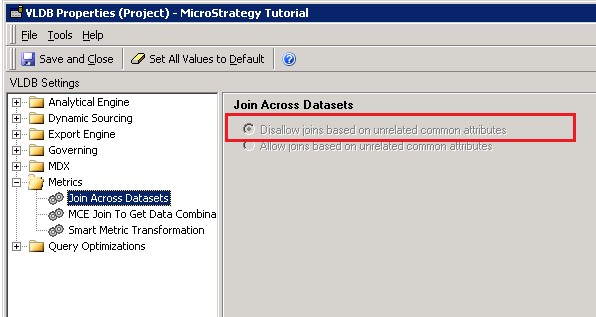
The setting "Allow joins across datasets based on unrelated common attributes" is checked by default when  dashboard/dossier created in Web., even when the corresponding setting in project level is disabled.

ka0PW0000001JRcYAM_0EM44000000A5qQ.png


ka0PW0000001JRcYAM_0EM44000000A5qV.png

The project level VLDB setting-->Join Across Dataset only affects the Document level setting, but not Dossier level setting. So users need to disable this setting in Dossier Level.
Below are the steps to disable this default setting:

  1. Find dashboard template in Object Templates\Analysis\ New Dossier (New Dashboard).
  2. Move the template to the Public Objects-->Reports.
  3. Go to Web and open New Dossier template-->File-->Dossier Properties -> Join Behavior-->Uncheck the setting-->Save and close the template. 
  4. Go back to Public Objects-->Reports. Move the new Modified New Dossier back to the original location.
  5. Go to Web, create a new dashboard, and check the join behavior checkbox. Then it is unchecked by default. 


Article Reference Number: KB440348
 
 
000040348 KB440348


Comment

0 comments

Details

Knowledge Article

Published:

March 27, 2018

Last Updated:

March 21, 2024