EducationSoftwareStrategy.com
StrategyCommunity

Knowledge Base

Product

Community

Knowledge Base

TopicsBrowse ArticlesDeveloper Zone

Product

Download SoftwareProduct DocumentationSecurity Hub

Education

Tutorial VideosSolution GalleryEducation courses

Community

GuidelinesGrandmastersEvents
x_social-icon_white.svglinkedin_social-icon_white.svg
Strategy logoCommunity

© Strategy Inc. All Rights Reserved.

LegalTerms of UsePrivacy Policy
  1. Home
  2. Topics

KB483907: How to display the text setting when using SAP BEx queries with SAP BW objects


Lilin Yu

Quality Engineer, Senior • MicroStrategy


This article explains why the text setting is ignored when using a SAP BEx query with SAP BW objects. This article also provides a workaround to the error.

Description


When using Live Connect on an SAP Business Explorer (BEx) query with Business Warehouse (BW) objects, the text setting is ignored.
In SAP BEx, the long description is turned on and is show in the output. However, Strategy shows the short text, instead of the long text. 
 

Why is this happening?


This behavior is expected in the design. Strategy uses MDX statements and cannot read the text settings at the SAP characteristic/query level.
According to the XMLA result, Strategy will directly use the contents of "Short Text." Although we can get the "Long Text" according to the XMLA result, we do not use them when parsing the result. 
 

Solution


All text names (short text/medium text/long text) are treated as attribute forms in Strategy. Therefore, you can directly use the attribute form, Long Name, to show the element to achieve such requirement.
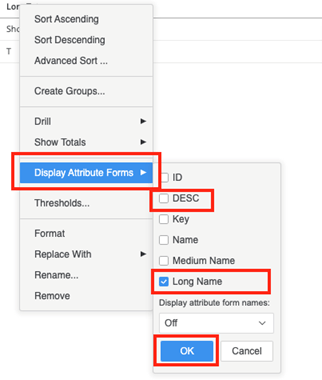
  • Open your SAP query.
  • Right click on an attribute > Display Attribute Forms.
  • Select Long Name.
  • Deselect DESC.
  • Click OK.
ka02R000000g5NJQAY_0EM2R000000nEkg.jpeg

Comment

0 comments

Details

Knowledge Article

Published:

December 19, 2019

Last Updated:

December 19, 2019