Starting with the release of Strategy ONE (March 2024), dossiers are also known as dashboards.
[DESCRIPTION]
Some business requirements include dynamically filtering data so that only the current month’s data is shown on a visual insight dashboard. Currently, filtering on date attributes using a dynamic date feature exists for both visual insight and report services documents. In order to utilize the feature, one can:
1. Add a date attribute into the filter
2. Click on the Calendar Icon (See screenshot below)
3. Check "Dynamic Date" option
4. Set it to "plus 0 months"
5. Click "OK" to save the setting and save the dashboard
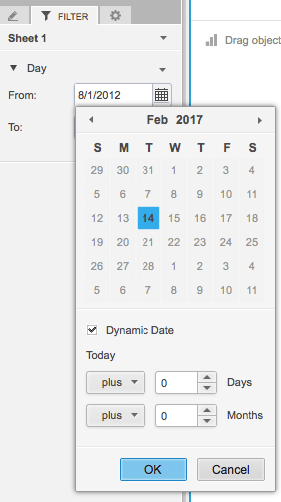
This feature is limited in that it cannot filter for the current month’s data dynamically. In other words, one can only filter on a set number of days or months. This solution only allows for a fixed time difference.
[WORKAROUND]
Add a report filter as per KB43660 to a grid report. Then, use the newly created report as a dataset.
KB483047
