EducationSoftwareStrategy.com
StrategyCommunity

Knowledge Base

Product

Community

Knowledge Base

TopicsBrowse ArticlesDeveloper Zone

Product

Download SoftwareProduct DocumentationSecurity Hub

Education

Tutorial VideosSolution GalleryEducation courses

Community

GuidelinesGrandmastersEvents
x_social-icon_white.svglinkedin_social-icon_white.svg
Strategy logoCommunity

© Strategy Inc. All Rights Reserved.

LegalTerms of UsePrivacy Policy
  1. Home
  2. Topics

KB441680: How to enable additional Kerberos debug logging on WebSphere 8.5+ running IBM JDK 7 or 8


Pascal Deguine

Principal Product Specialist • Strategy


This knowledge base article outlines steps to enable additional Kerberos debug logging on WebSphere 8.5+ running IBM JDK 7 or 8

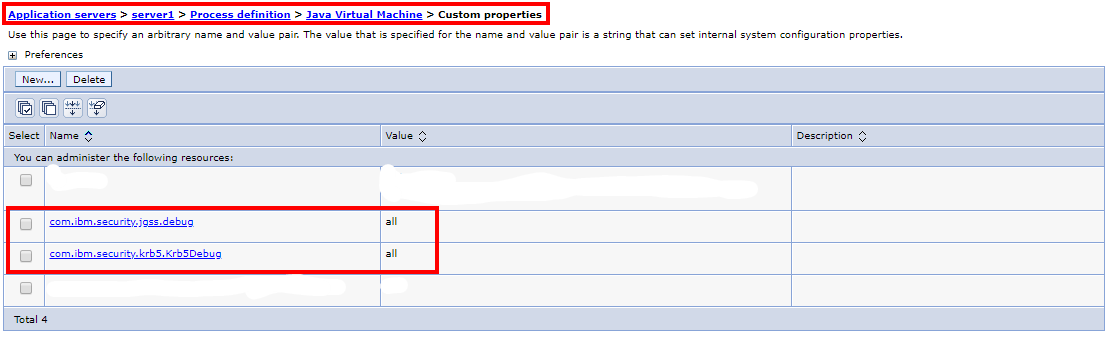
For additional logging when troubleshooting Kerberos issues occurring on WebSphere running on IBM JDK 7 or 8, the following JVM startup options can be set:

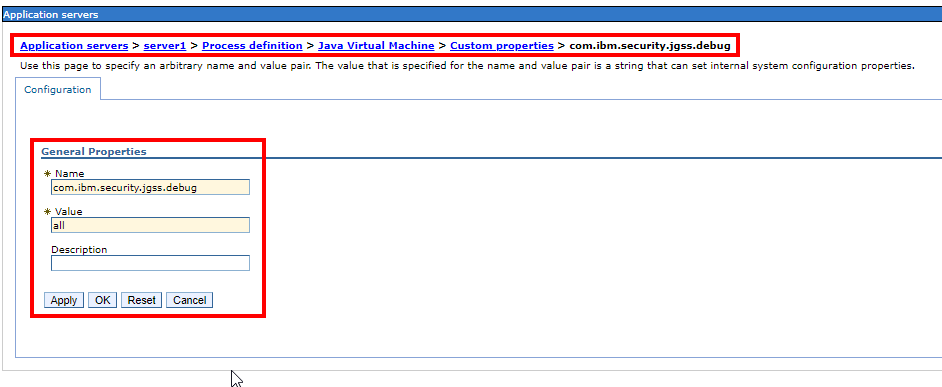
  • com.ibm.security.jgss.debug=all
  • com.ibm.security.krb5.Krb5Debug=all


1. In the WebSphere console, navigate to Application servers > server1 > Process definition > Java Virtual Machine > Custom properties.
2. Click New
ka044000000kOwJAAU_0EM44000000QoNN.png

3. Click ok and save changes.

ka044000000kOwJAAU_0EM44000000QoNS.png

4. Restart WebSphere for changes to take effect.
Note:

  • Kerberos debug trace will be logged into WebSphere systemOut.log.
  • Do not keep the debug trace enabled over a long period of time or in production.

Knowledge Base article ID: KB441680


Comment

0 comments

Details

Knowledge Article

Published:

September 13, 2018

Last Updated:

December 24, 2018