By default, Tomcat utilizes basic authentication to protect and control access to certain pages such as the Strategy Web Admin page. These credentials are stored as plain text in the
tomcat-users.xmlfile located in Tomcat’s
conffolder as seen below.
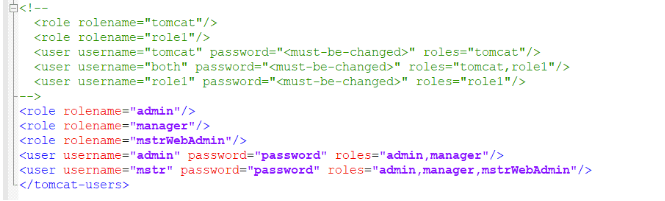
To enhance the security of Tomcat, the passwords stored in the
tomcat-users.xmlfile can be encrypted.
This is the default configuration of Tomcat.
The below steps can be followed to encrypt the passwords stored in the
tomcat-users.xmlfile.
C:\Program Files (x86)\Common Files\MicroStrategy\JRE\180_252\Win64.
server.xml. If using Tomcat installed as part of the Strategy installation on a Windows machine, the default location will be
C:\Program Files (x86)\Common Files\MicroStrategy\Tomcat\apache-tomcat-9.0.30\conf.
server.xmlto match the below screenshot. The following entry will need to be added, and the
/after “
UserDatabase” will need to be removed.
<CredentialHandler className="org.apache.catalina.realm.MessageDigestCredentialHandler" algorithm="sha-256" /></Realm>
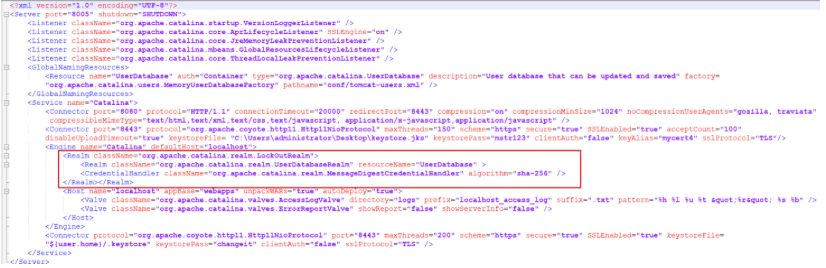
server.xml.
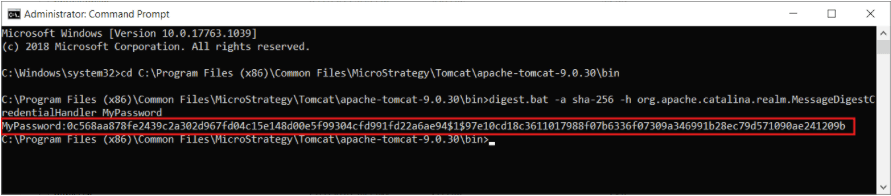
C:\Program Files (x86)\Common Files\MicroStrategy\Tomcat\apache-tomcat-9.0.30\bin).
sha-256is the algorithm specified in step 3.
digest.bat -a sha-256 -h org.apache.catalina.realm.MessageDigestCredentialHandler MyPassword
digest.sh -a sha-256 -h org.apache.catalina.realm.MessageDigestCredentialHandler MyPassword
<clear text pwd>:<encrypted pwd>. For example,
MyPassword:0c568aa878fe2439c2a302d967fd04c15e148d00e5f99304cfd991fd22a6ae94$1$97e10cd18c3611017988f07b6336f07309a346991b28ec79d571090ae241209bas seen below.
tomcat-users.xml.

