EducationSoftwareStrategy.com
StrategyCommunity

Knowledge Base

Product

Community

Knowledge Base

TopicsBrowse ArticlesDeveloper Zone

Product

Download SoftwareProduct DocumentationSecurity Hub

Education

Tutorial VideosSolution GalleryEducation courses

Community

GuidelinesGrandmastersEvents
x_social-icon_white.svglinkedin_social-icon_white.svg
Strategy logoCommunity

© Strategy Inc. All Rights Reserved.

LegalTerms of UsePrivacy Policy
  1. Home
  2. Topics

How to find the DSN that is used by Intelligence Server to connect to its metadata


Stefan Sander

Senior Principal Consultant • MicroStrategy


While there is no location within the MicroStrategy products Graphical Unit Interface (GUI) where a user can determine the DSN being used by MicroStrategy Intelligence Server to connect to the metadata, it is possible to determine this information by looking in the registry. This KB article describes how on Windows and Linux systems.

Linux

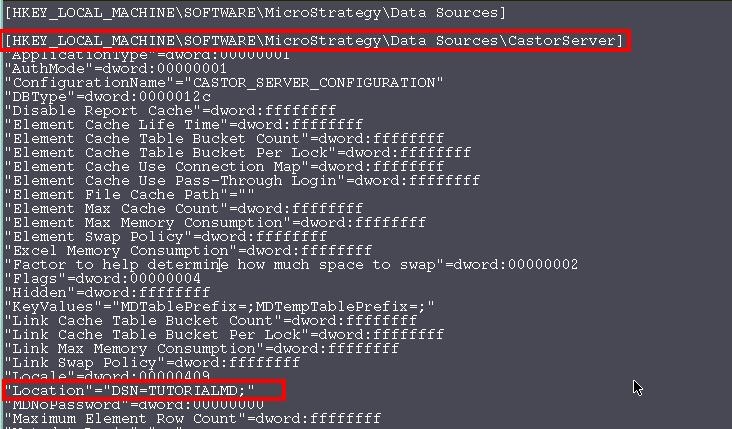
Open the MSIReg.reg file and search for 'Location' under, as shown below:
 

ka04W000001It46QAC_0EM440000002Bac.jpeg


Windows

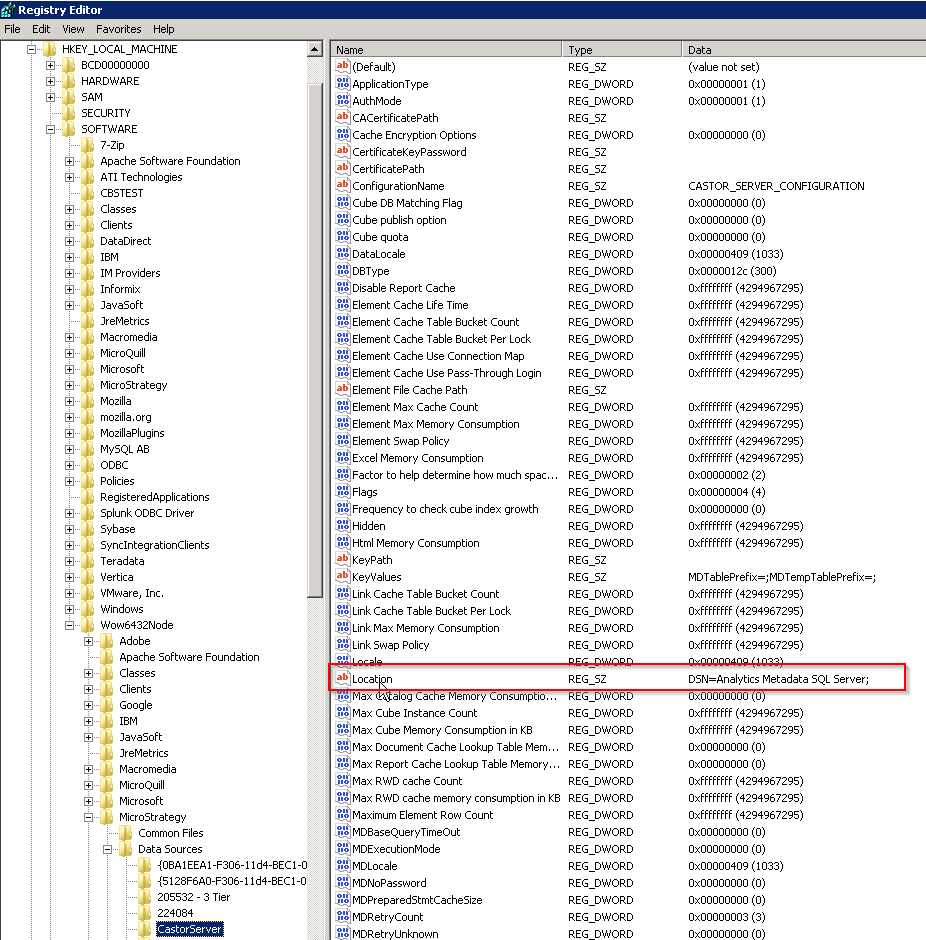
On Windows 64-bit environments, navigate to the registry key shown in the image below: HKEY_LOCAL_MACHINE\SOFTWARE\Wow6432Node\Strategy\Data Sources\Castor Server\Location
ka04W000001It46QAC_0EM44000000A475.png

On Windows 32-bit environments, navigate to the registry key shown in the image below:
HKEY_LOCAL_MACHINE\SOFTWARE\Strategy\Data Sources\Castor Server\Location
REGISTRY SETTING WARNING:
Modifying registry values incorrectly may cause serious, system-wide problems that may require the re-installation of Microsoft Windows NT. Any edit of the registry is done at the user`s own risk. Since these are user-initiated changes, they are not covered by any Strategy warranty. If using Microsoft Windows NT, the user should backup the registry and/or update an Emergency Repair Disk (ERD) prior to alterations. KB440056


Comment

0 comments

Details

Knowledge Article

Published:

December 22, 2021

Last Updated:

December 22, 2021