When our IServer is configured to connect to a PostgreSQL MD which has two nodes.
Sample DSN in odbc.ini
METADATA=PostgreSQL Unicode(x64)

[METADATA]
Driver=/opt/mstr/MicroStrategy/install/pgsql-12/lib/psqlodbcw.so
Description=PostgreSQL
Unicode(x64)
Database=md
Servername=10.23.39.143,10.23.38.175 Port=5432,5432
Pqopt=target_session_attrs=read-write
Protocol=
ReadOnly=
RowVersioning=
ShowSystemTables=
ConnSettings=
DriverUnicodeType=1
In the event of the Primary node being down, the cached DB connection in IServer becomes invalid, requiring the creation of a new DB connection to MD. The DB connection process involves the PostgreSQL native ODBC driver attempting to connect to the first node first, with a timeout period specified. If the connection attempt fails, it then tries to connect to the second node. By default, this process takes approximately 127 seconds to create a new MD connection.
After careful in-house testing, we have identified two potential solutions, each with its own set of advantages and disadvantages. We recommend selecting one of these solutions based on the specific circumstances:
1. Change the default Metadata connect time-out setting to 10 seconds.
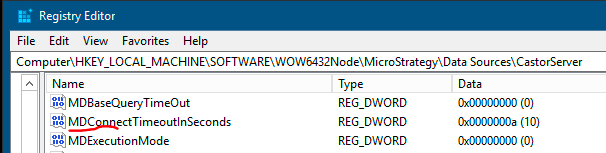
We can change the connection timeout setting by adding a new registry value named ‘MDConnectTimeoutInSeconds' in the I-Server instance registry, with DWORD(32-bit) type, which holds the integer as the value.
The new registry key will be put in the following location for the I-Server instance ‘CastorServer’:
[HKEY_LOCAL_MACHINE\SOFTWARE\WOW6432Node\MicroStrategy\Data Sources\CastorServer]

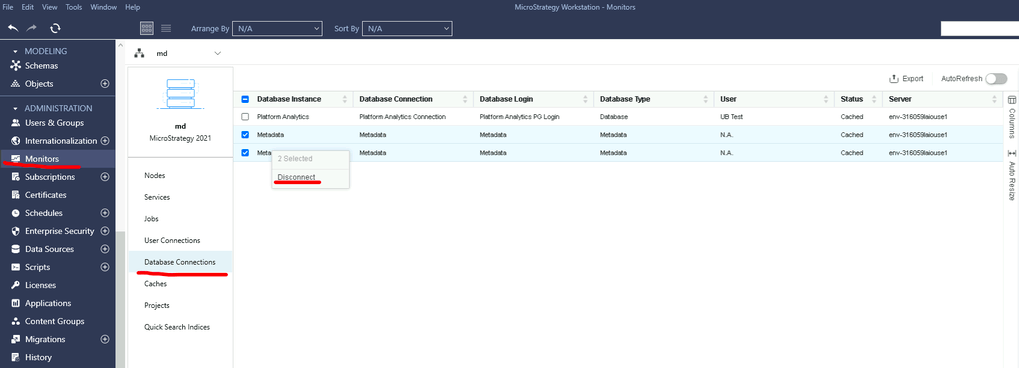
2. Swap the two hosts and ports in DSN and clean the old MD connection cache
(1) Swap the two hosts and ports in DSN
We can swap the two hostnames in odbc.ini, and put the name of the living node first.
For example, if node
10.23.39.143is down, and node
10.23.38.175is alive, we can change server name from
10.23.39.143,10.23.38.175to
10.23.38.175,10.23.39.143,then with the name of the live node listed first, new DB connections can be created without any delay.
#!/bin/bash

# Get Metadata DSN from MSIReg.reg
get_dsn_name() {
    dsn_name=$(grep -Po '"Location"="DSN=\K[^;]+(?=;)' MSIReg.reg)
    echo "$dsn_name"
}

# check whether the driver of DSN is "PostgreSQL Unicode(x64)"
check_driver() {
    dsn_name="$1"
    driver=$(awk -v dsn="METADATA2" -F '=' '/^\[.*\]$/{found=(substr($1, 2, length($1)-2) == dsn)} found && /^Description=/{print $2; exit}' odbc.ini)
    if [[ "$driver" == "PostgreSQL Unicode(x64)" ]]; then
        return 0
    else
        return 1
    fi
}

# Retrieve DSN's servername and port
get_servername_and_port() {
    dsn_name="$1"
    servername=$(awk -v dsn="$dsn_name" -F '=' '/^\[.*\]$/{found=(substr($1, 2, length($1)-2) == dsn)} found && /^Servername=/{print $2; exit}' odbc.ini)
    port=$(awk -v dsn="$dsn_name" -F '=' '/^\[.*\]$/{found=(substr($1, 2, length($1)-2) == dsn)} found && /^Port=/{print $2; exit}' odbc.ini)
    echo "$servername%$port"
}

#Test connection
test_connection() {
    servername="$1"
    port="$2"
    IFS=',' read -ra servername_array <<< "$servername"
    IFS=',' read -ra port_array <<< "$port"

    for (( i=0; i<${#servername_array[@]}; i++ )); do
        echo "Testing connection to ${servername_array[0]}:${port_array[0]}"
	nc_output=$(nc -z -w5 "${servername_array[0]}" "${port_array[0]}" 2>&1)
        if [[ $? -ne 0 ]]; then
            echo "Connection failed, rearranging Servername and Port"
            failed_servername=${servername_array[0]}
            failed_port=${port_array[0]}
	        servername_array=("${servername_array[@]:1}")
            port_array=("${port_array[@]:1}")

	    servername_array+=("$failed_servername")
	    port_array+=("$failed_port")

	    servernamestring=$(IFS=,;echo "${servername_array[*]}")
	    portstring=$(IFS=,;echo "${port_array[*]}")
	    update_odbc_ini "$dsn_name" "$servernamestring" "$portstring"
        else
            echo "Connection successful"
            return 1
        fi
    done

    return 0
}

# Update odbc.ini file to rearranging Servername and Port
update_odbc_ini() {

    dsn_name="$1"
    servername="$2"
    port="$3"
    sed -i "/^\[$dsn_name\]$/,/^\[/ s/^Servername=.*/Servername=$servername/" odbc.ini
    sed -i "/^\[$dsn_name\]$/,/^\[/ s/^Port=.*/Port=$port/" odbc.ini
}

# Main loop

while true; do
	dsn_name=$(get_dsn_name)
	if [[ -z "$dsn_name" ]]; then
		echo "Failed to retrieve DSN name"
		exit 1
	fi


	if ! check_driver "$dsn_name"; then
		echo "DSN driver is not PostgreSQL Unicode(x64)"
		exit 0
	fi


	servername_and_port=$(get_servername_and_port "$dsn_name")
	if [[ -z "$servername_and_port" ]]; then
		echo "Failed to retrieve servername and port"
		exit 1
	fi


	servername=$(echo "$servername_and_port" | cut -d '%' -f 1)
	port=$(echo "$servername_and_port" | cut -d '%' -f 2)


	if test_connection "$servername" "$port"; then
		exit 0
	fi

	sleep 60
done
See the attached video for a demonstration illustrating the comparison among "no MD failover", "MD failover" and "MD failover with workaround#1".
