In a PostgreSQL database, there is a setting called
work_mem. This setting specifies the amount of memory used by internal sort operations and hash tables before writing to temporary disk files.
work_memsetting is 4 MB; however, for complex queries, 4 MB is not enough memory. As a result, the database will write data into the temporary files and slow performance.
work_memvalue.
Before proceeding, first check the execution plan of the query to identify if the
work_memsetting needs to increased.
Explain analyze %detail query%.
Sort Method: external merge Disk: 7904kBis in the output, it means you should enlarge the
work_memsetting to increase performance.
Unique (cost=1776305.27..1795533.74 rows=1281898 width=125) (actual time=5724428.491..5724482.724 rows=53884 loops=1) -> Sort (cost=1776305.27..1779510.01 rows=1281898 width=125) (actual time=5724418.229..5724440.259 rows=53884 loops=1) Sort Key: info.object_id, info.object_type, info.parent_id, info.object_name, info.subtype Sort Method: external merge Disk: 7904kB -> Merge Anti Join (cost=1.11..1479755.68 rows=1281898 width=125) (actual time=81.503..5716910.713 rows=53884 loops=1) Merge Cond: (info.object_id = depn.depn_objid) Join Filter: ((info.project_id = depn.depn_prjid) OR (info.project_id = '38A062302D4411D28E71006008960167'::bpchar)) -> Index Scan using pk_objinfo on dssmdobjinfo info (cost=0.55..195982.82 rows=1298902 width=125) (actual time=32.483..1055089.072 rows=1298855 loops=1) Index Cond: (project_id = '6687D3624ADF1788083B618D23BBFE33'::bpchar) Filter: (object_state = 1) Rows Removed by Filter: 1018 -> Index Only Scan using ix_objdepn_depn on dssmdobjdepn depn (cost=0.56..1144184.24 rows=7799180 width=66) (actual time=0.066..4654472.770 rows=7799152 loops=1) Heap Fetches: 7799159 Planning Time: 195.356 ms Execution Time: 5724504.323 ms
There are a few ways to increase the
work_memsetting. Use any of the following options to increase the value.
work_memmeans the amount of memory consumed by each session is increased. As a result, this may cause the PostgreSQL database memory usage to increase. If your Postgre Server's memory is short, it may lead to an "Out of Memory" error.
%PGSERVER%/Data/postgresql.conf.
#work_mem = 4MB # min 64kB.
work_mem = 50MB # min 64kB
The change will take affect and apply to all user sessions.
In the PostgreSQL database, execute the following command to set the
work_memvalue of usernameA to 50 MB.
ALTER ROLE usernameA SET work_mem TO '1GB'
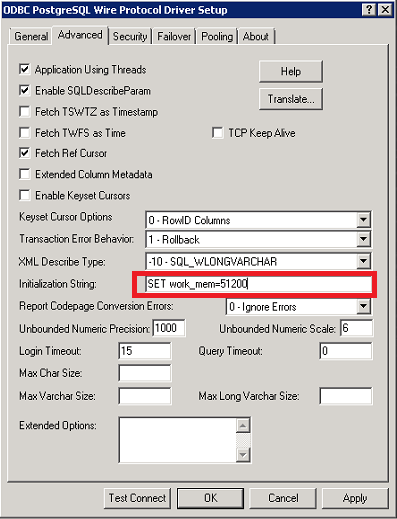
This change will apply to all connections created by the DSN.
ConnSettings=SET WORK_MEM=51200
InitializationString=SET WORK_MEM=51200
This change will apply to all connections created by the DSN.
