Starting with the release of Strategy ONE (March 2024), dossiers are also known as dashboards.
Troubleshooting
How to Merge Row Headers in the Grid Visualization in Visual Insight with Strategy Web 10.x
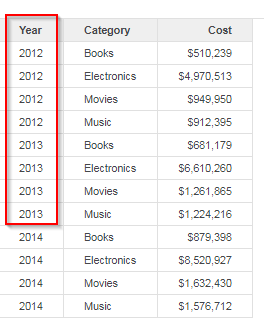
With Strategy Web 10.x, it seems that when users create a grid visualization in Visualization Insight (Dossier), many times that row headers are not merged. For example, if they want one row for one year. All of 2012 would appear as one single cell rather than the repetition of the year within the grid. This article will go through examples and steps to merge the row headers. An example of this type of grid is presented in the image below:
Status
ACKNOWLEDGED IN-PROGRESS SOLVED (Version: 10.x+, Strategy 2019)
Next Steps
Follow one of the options below to merge the row headers into a single entry:
For the first option:
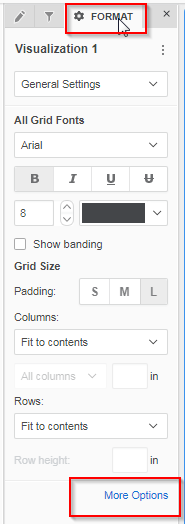
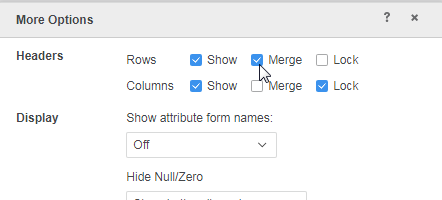
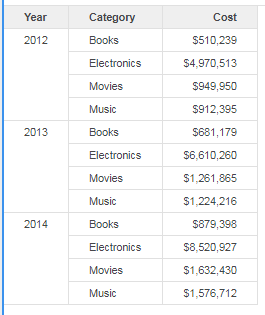
Upon making this selection, the row headers will now be merged, as shown below.
Note: The year 2012 now appears as one cell rather than individual rows.
For the second option:
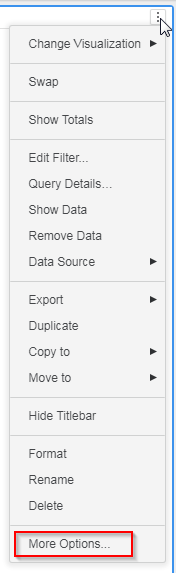
Upon making this selection, the row headers will now be merged.
You're now good to go and all rows should be merged.
If you have any other questions, feel free to start a discussion or reach out to your Support liaison to create a case!
Want to update to Strategy 2019? Visit the Strategy website to learn more!
