Remote Diagnostics is a feature that gathers customer's environment, platform, and license information to help improve Strategy products and enhance user experience. This information is collected by an
envinfo-collector.jarbinary that is executed periodically. This periodic execution, which by default occurs every 30 minutes, is enabled whenever Strategy Services Registration is running.
hs_err_pid<pidnumber>.mdmpfile generated by
envinfo-collector.jarbinary under Services Registration's directory.
Under certain conditions, such as very high memory utilization, the
envinfo-collector.jarbinary may crash and, consequently, the underlying Java Virtual Machine (JVM) will generate an
hs_err_pid<pidnumber>.mdmpfile. Depending on the
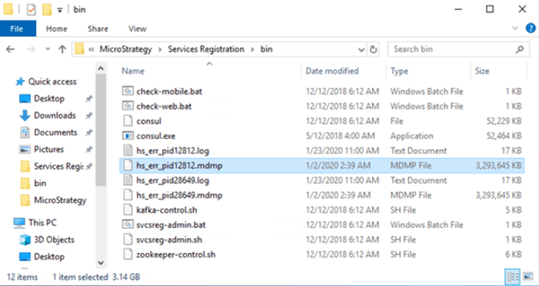
envinfo-collector.jar's memory footprint, the dump file can be very large, reaching up to 3 GB in size, as shown in the above screenshot. In addition, since the
envinfo-collector.jaris executed periodically, it is likely that multiple dump files are generated and further cause disk space depletion. Left untreated, the low disk space condition can lead to performance issues ranging from slow response to denial-of-service.
Follow these steps to prevent the large
hs_err_pid<pidnumber>.mdmpfile from being generated:
hs_err_pid
.mdmpfile is located, may belong to a Topology cluster, e.g., a collection of nodes whose services can be administered through a Topology view inside Strategy Workstation.
mstr_services_config.yamlfile inside the
yamlsub folder of the Services Registration Directory.
C:\Program Files (x86)\Services Registration\yaml\ mstr_services_config.yaml.
mstr_services_config.yamlfile, add the following entry in red:
…
  #This is a "dummy" check that triggers env info collection
  #It is coexisting with REST Server
  -
    name: "Env-Info-Collection-Scheduler"
    id: "Env-Info-Collection-Scheduler"
    args:
    - "<JavaInstallPath>/java"
    - "-XX:-CreateMinidumpOnCrash"
    - "-jar"
    - "../jar/envinfo-collector.jar"
    - "send"
    interval: 30m
    timeout: 15m
…
Strategy-Library-REST-Server.jsonfile inside the config sub folder of the Services Registration directory.
Strategy-Library-REST-Server.jsonfile, add the following entry in red:
… { "name": "Env-Info-Collection-Scheduler", "id": "Env-Info-Collection-Scheduler", "args": [ "C:\\Program Files (x86)\\Common Files\\Strategy\\JRE\\180_192\\Win64\\bin\\java", "-XX:-CreateMinidumpOnCrash", "-jar", "../jar/envinfo-collector.jar", "send" ], "interval": "30m", "timeout": "15m" } …An
hs_err_pid<pidnumber>.logfile is also generated together with
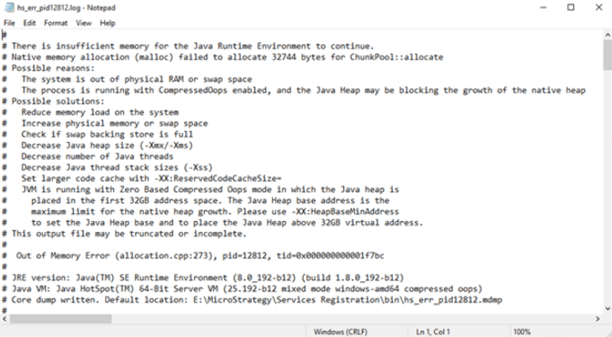
every hs_err_pid<pidnumber>.mdmpfile. This log file contains basic information regarding the root cause behind the crash that generates the large dump file. The
hs_err_pid<pidnumber>.logfile also contains several possible solutions that may prevent the crash from occurring again.
hs_err_pid<pidnumber>.logfile provides an example of a root cause and potential solutions to a crash.