EducationSoftwareStrategy.com
StrategyCommunity

Knowledge Base

Product

Community

Knowledge Base

TopicsBrowse ArticlesDeveloper Zone

Product

Download SoftwareProduct DocumentationSecurity Hub

Education

Tutorial VideosSolution GalleryEducation courses

Community

GuidelinesGrandmastersEvents
x_social-icon_white.svglinkedin_social-icon_white.svg
Strategy logoCommunity

© Strategy Inc. All Rights Reserved.

LegalTerms of UsePrivacy Policy
  1. Home
  2. Topics

KB484499: How to programmatically check the status of past subscriptions and potentially re-trigger them


Ippei Takahashi

Director, Sales Engineering • MicroStrategy


This article provides steps for programmatically checking the status of past subscriptions. This article also explains how to re-trigger failed subscriptions and automate the re-trigger.

Starting with the release of Strategy ONE (March 2024), dossiers are also known as dashboards.

To check the status of subscriptions


The easiest way to check the status of historically triggered subscriptions is to check Platform Analytics. You can either query the Platform Analytics warehouse or use the Platform Analytics Cube to create the report you need.
There is a pre-built dossier called Subscription Analysis, but it does not by default specify the Status field. Thus, you must make modifications to find what you are looking for.
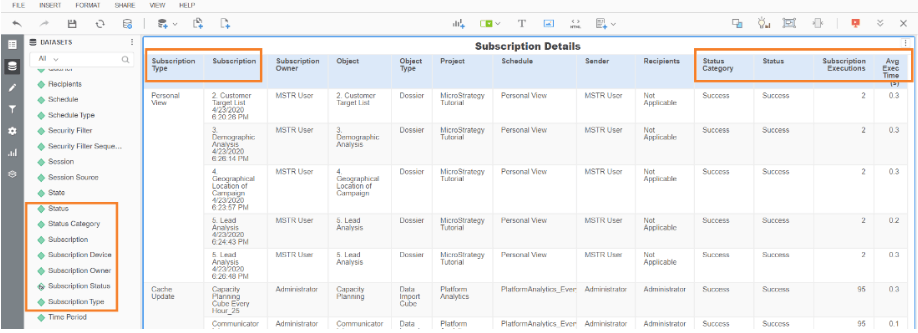
  • Open Strategy Web.
  • Navigate to Platform Analytics.
  • Open either the Subscription Analysis dossier or a new dossier and point to Platform Analytics Cube.
  • Select the following objects to create a new grid:
    1. Subscription
    2. Subscription Type
    3. Subscription Owner
    4. Object
    5. Object Type
    6. Schedule
    7. Sender
    8. Recipients
    9. Subscription executions
    10. Avg Exec Time (s)
    11. Status Category
    12. Status
  • Specify the proper date filter.
  • Specify the appropriate filter for the Status field.
  • (Optional) Subscribe to this report so it will be delivered to the administrator.
ka0PW0000001JmWYAU_0EM2R000000aki3.jpeg
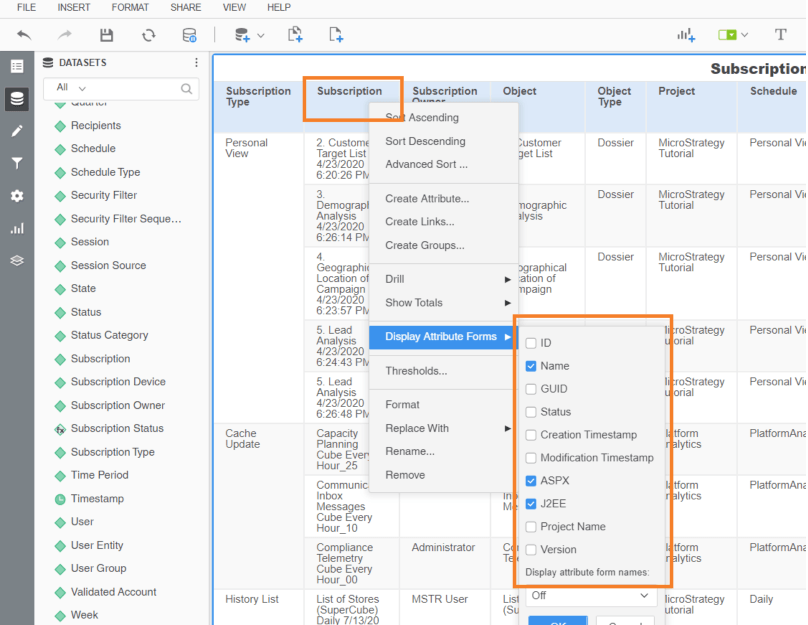
  • Trick: There are “hidden” attribute forms that are a part of the Subscription attribute. Make sure to right-click and add the ones that may be helpful.
ka0PW0000001JmWYAU_0EM2R000000aki8.jpeg

To re-trigger failed subscriptions


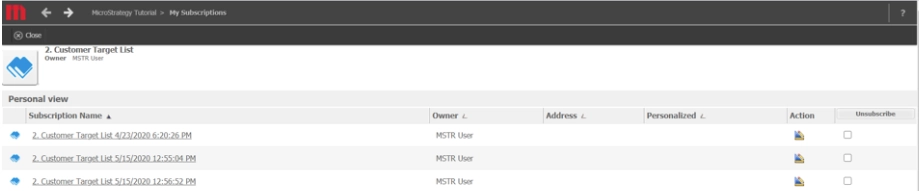
If some subscriptions have failed, you may want to re-trigger these subscriptions so they are re-executed. This is a fairly common workflow for administrators. To do so, follow these steps:
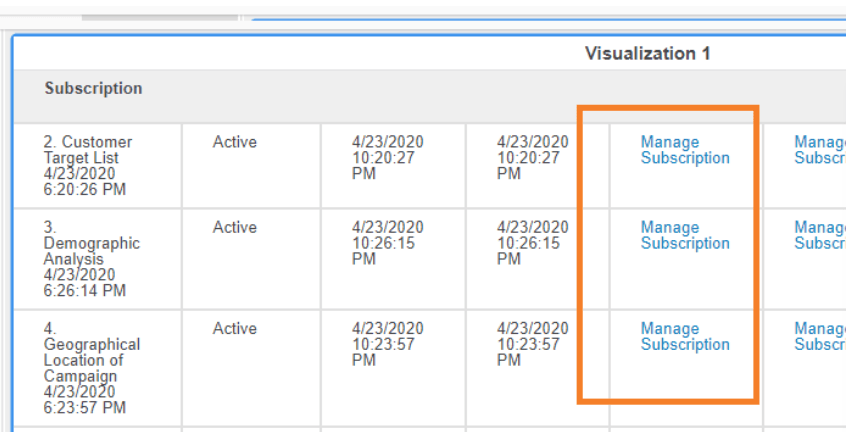
  • Right-click on the Subscriptions column header.
  • Click on Display Attribute Forms.
  • Select either J2EE or ASPx, depending on your web server
  • This will enable a hyperlink column that can take the administrator to the Subscriptions page in Strategy Web, where they can be re-triggered.
ka0PW0000001JmWYAU_0EM2R000000akiw.jpeg
ka0PW0000001JmWYAU_0EM2R000000akj1.jpeg

To automate the re-trigger


If you regularly experience failed subscriptions, you may want to automate the re-trigger process and have it iterate through the re-executions. Luckily, there are multiple options.
You first need a mechanism to take the information from above (e.g., Platform Analytics logs), which gives you a list of subscriptions that need to be re-executed. Taking that list, you would use one of the methods below:
 

Via Command Manager


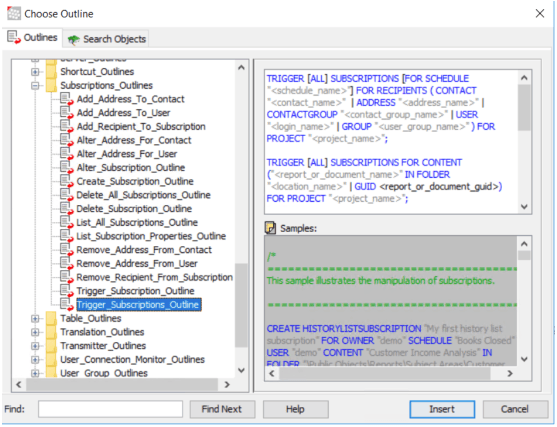
Command Manager offers outlines for triggering subscriptions. This can be found in the Command Manager GUI, which can be installed on a Windows machine.
ka0PW0000001JmWYAU_0EM2R000000akjf.jpeg


Once you have the Command Manager command and the syntax you need, you want to create a Command Manager Procedure so you can wrap Java logic around it. This will give you the ability to read the list of Subscription IDs (from the file mentioned above) and iterate through them. For more information see About Events and Event Triggered Schedules. 
A Command Manager Procedure must be referenced in a script file (*.scp) to be executed. This scp file can be executed from a command line, System Manager workflow, or a third-party workflow management tool. For more information, reference the following doc:

  • MicroStrategy Command Manager Help
  • Web API Reference 

Via Web Java SDK

There are Java classes and code examples to perform this type of triggering functionality. Since it’s over Web SDK, you will have various options for iteration and automation. For more information, see KB31981: How to trigger an event based schedule using the MicroStrategy Web Java SDK 10.x.


Comment

0 comments

Details

Knowledge Article

Published:

August 6, 2020

Last Updated:

March 21, 2024