EducationSoftwareStrategy.com
StrategyCommunity

Knowledge Base

Product

Community

Knowledge Base

TopicsBrowse ArticlesDeveloper Zone

Product

Download SoftwareProduct DocumentationSecurity Hub

Education

Tutorial VideosSolution GalleryEducation courses

Community

GuidelinesGrandmastersEvents
x_social-icon_white.svglinkedin_social-icon_white.svg
Strategy logoCommunity

© Strategy Inc. All Rights Reserved.

LegalTerms of UsePrivacy Policy
  1. Home
  2. Topics

KB485009: How to remove highlight on hover in dossier’s presentation mode and MicroStrategy Library


Grzegorz Sykut

Senior Consultant • Strategy


This article outlines how to remove highlight on hover in dossier’s presentation mode and MicroStrategy Library.

Starting with the release of Strategy ONE (March 2024), dossiers are also known as dashboards.

Symptom


When running dossier in presentation mode or in Strategy Library, by default users can see visualization border when hovering over it as visible on screenshot below (shadow-like effect on the outside of the box).

 

ka0PW0000001JfvYAE_0EM4W0000027fhT.jpeg

Root Cause

This is default behavior of Strategy and is working as planned, however some users may want to remove this effect.
 

Solution


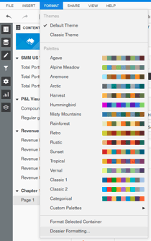
This can be easily fixed on dossier level in Format -> Dossier Formatting…
ka0PW0000001JfvYAE_0EM4W0000027fhn.jpeg

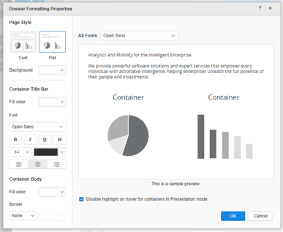
Upon opening, at the bottom of the window option “Disable highlight on hover when in presentation mode” needs to be ticked.
ka0PW0000001JfvYAE_0EM4W0000027fi2.jpeg

After doing so, highlight should be no longer visible.


Comment

0 comments

Details

Knowledge Article

Published:

April 27, 2021

Last Updated:

March 21, 2024