SUMMARY:
This article discusses a possible scenario involving JDBC source connectivity where the Java Heap Size needs to be increased, and how to set that new value in Strategy Web and Developer 2021.
SYMPTOM:
In Strategy 10.11 and later, an error may appear when running a report or document indicating insufficient Java heap space available for the executed task:
Document Execution Failed: One or more dataset reports returned an error.
Document 1 [1569C9024E15D62F7DC78E8B0DAC8BDB]: (QueryEngine encountered error: JdbcResultWrapper::Fetch failed. Disconnected. Error type: Unknown exception. Jdbc operation attempted: FetchTable. Error Message:Java heap space.. Error in Process method of Component: QueryEngineServer, Project 1, Job 2408, Error Code= -2147212544.)
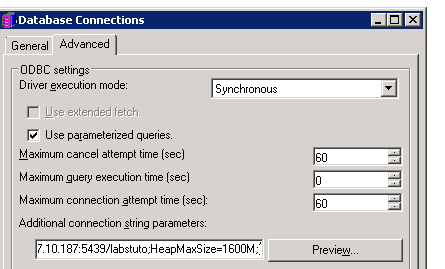
To edit from Strategy Web:
1.) Navigate to the available data sources for Data Import.
2.) Edit the desired data source, or create a new DSN-less connection and add the parameter to the “Connection String” section.
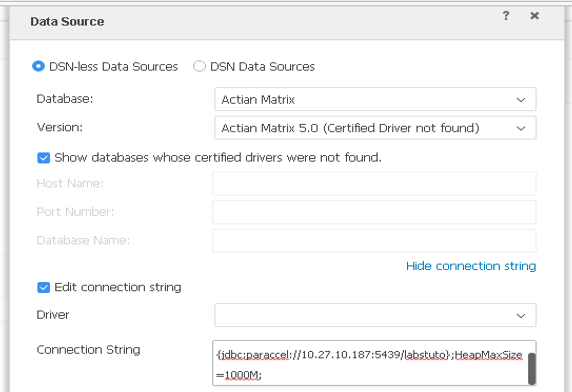
NOTE: Strategy recommends setting this value slightly higher than the machine’s available physical memory to avoid performance issues.
WORKAROUND:
For Strategy 10.10 and below, edit the below registry setting to increase the available Java heap space. This change will affect all JVM processes:
HKEY_LOCAL_MACHINE\SOFTWARE\MicroStrategy\JNI Bridge\Config for DataServices\32-bit JVM\HeapMaxSize
HKEY_LOCAL_MACHINE\SOFTWARE\MicroStrategy\JNI Bridge\Config for DataServices\64-bit JVM\HeapMaxSize
HKEY_LOCAL_MACHINE\SOFTWARE\MicroStrategy\JNI Bridge\Config for DataServices\64-bit JVM\HeapMaxSize
