EducationSoftwareStrategy.com
StrategyCommunity

Knowledge Base

Product

Community

Knowledge Base

TopicsBrowse ArticlesDeveloper Zone

Product

Download SoftwareProduct DocumentationSecurity Hub

Education

Tutorial VideosSolution GalleryEducation courses

Community

GuidelinesGrandmastersEvents
x_social-icon_white.svglinkedin_social-icon_white.svg
Strategy logoCommunity

© Strategy Inc. All Rights Reserved.

LegalTerms of UsePrivacy Policy
  1. Home
  2. Topics

KB484274: How to set up SAML with LDAP features in MicroStrategy JSP Web/Mobile 10.6 and above


Yuxia Zhang

Quality Engineer • MicroStrategy


This article provides instructions for setting up SAML authentication with LDAP features in MicroStrategy JSP Web/Mobile 10.6 and above.

User Mapping 


Distinguished name attribute can be used to link SAML users to Strategy users.
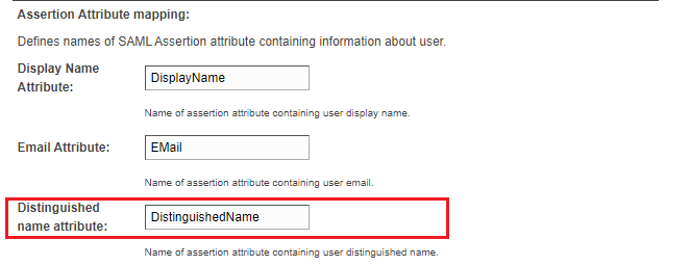
  • On the Strategy SAML Configuration page, define the Distinguished name attribute. For example, DistinguishedName. 
ka02R000000bsKTQAY_0EM2R000000fdRB.jpeg
  • Configure IDP to pass a SAML attribute with the same name in SAML response. For this example, “DistinguishedName," with the value of the user’s Distinguished name.
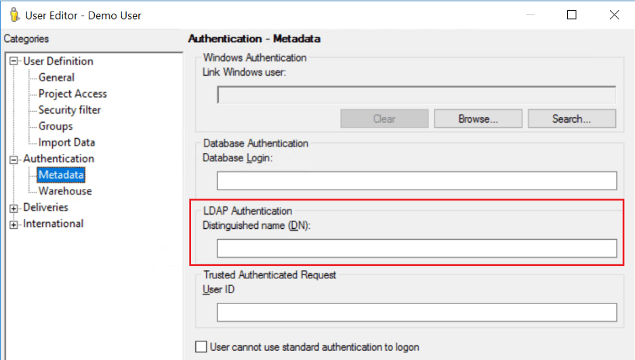
    In Strategy Developer > User Editor, enter the Distinguished name value for the mapped user.
ka02R000000bsKTQAY_0EM2R000000fdRV.jpeg
  •  
    In this way, a SAML user is mapped to a Strategy user using Distinguished name (DN), and the SAML user will be logged in as the mapped Strategy user in Strategy Web/Mobile. In general, there is no need to further map Trusted Authenticated Request User ID, given that DN has already been mapped.

Admin Groups


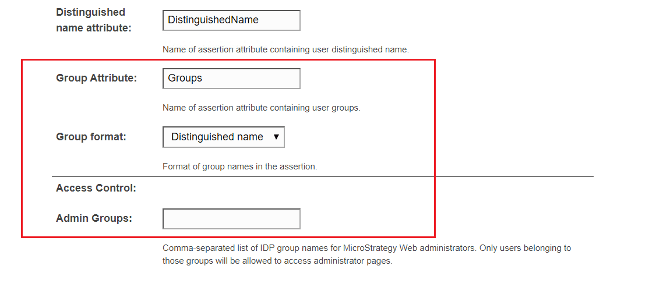
The Admin Groups field in the SAML Configuration page is for access control of the Strategy Web/Mobile Administrator page. A user is able to access the Strategy Web/Mobile Administrator page if he or she belongs to the admin groups that are predefined in the SAML Configuration page. Otherwise, a 403 error is displayed.
ka02R000000bsKTQAY_0EM2R000000fdSO.jpeg


To utilize LDAP integration with SAML, Group format can be set to Distinguished name. In the Admin Groups field, enter the value of the CN field of the user’s group DN.
For example, in a SAML response, a user has a SAML attribute called “Groups” and its value is “CN=mstrAdmin, ou=Groups, dc=edu," as shown below:
<saml2:Attribute Name="Groups " NameFormat="urn:oasis:names:tc:SAML:2.0:attrname-format:unspecified">
<saml2:AttributeValue xmlns:xs="http://www.w3.org/2001/XMLSchema" xmlns:xsi="http://www.w3.org/2001/XMLSchema-instance" xsi:type="xs:string">CN=mstrAdmin,ou=Groups, dc=edu</saml2:AttributeValue>
</saml2:Attribute>
In the Admin Groups field, enter mstrAdmin. 
Note: 

  • All the fields in Strategy SAML configuration page are case sensitive.
  • Use a comma to separate multiple group values without spaces.
  • The name of the group attribute from the SAML response needs to match the value of the Group Attribute field on the Strategy SAML configuration page. In the above example, the name of the groups attribute is “Groups."

Comment

0 comments

Details

Knowledge Article

Published:

May 19, 2020

Last Updated:

May 19, 2020