EducationSoftwareStrategy.com
StrategyCommunity

Knowledge Base

Product

Community

Knowledge Base

TopicsBrowse ArticlesDeveloper Zone

Product

Download SoftwareProduct DocumentationSecurity Hub

Education

Tutorial VideosSolution GalleryEducation courses

Community

GuidelinesGrandmastersEvents
x_social-icon_white.svglinkedin_social-icon_white.svg
Strategy logoCommunity

© Strategy Inc. All Rights Reserved.

LegalTerms of UsePrivacy Policy
  1. Home
  2. Topics

How to set-up the Y axis size to make sure the data label negative values don’t overlap with X Axis


Community Admin

• Strategy


This Knowledge Base article describes how to set-up the Y axis size to make sure the data label negative values don’t overlap with X Axis.

SYMPTOM:
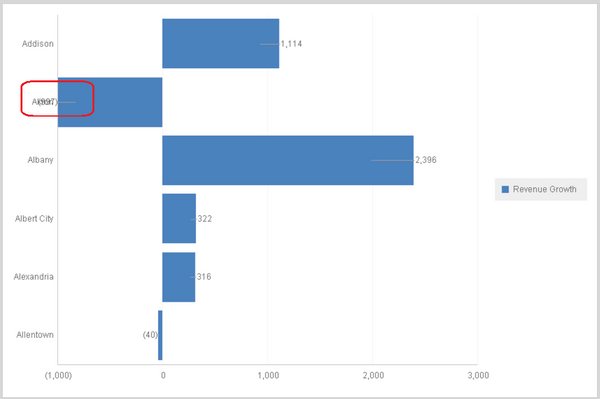
When there are negative values for data labels for graph chart, the data label may overlap with X Axis and make the data label is not quite clear to recognize. Check below screen shot:
ka04W000000OfsOQAS_0EM4400000025PE.jpeg

 
ACTION:
For Document:
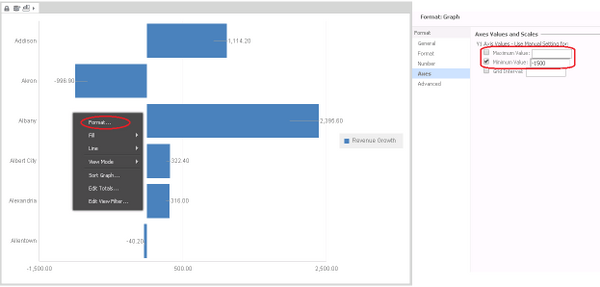
In Editable mode, right click the graph and choose ‘Format’, and navigate to ‘Axes’. Set-up a customized value in ‘Minimum Value’ according to the minimum value of the graph.
ka04W000000OfsOQAS_0EM4400000025PR.jpeg

 
For VI dashboard:
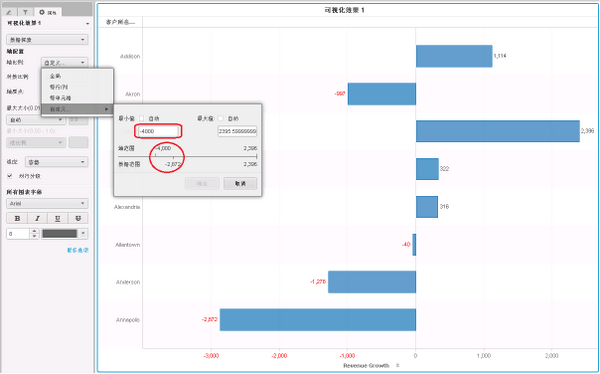
In Properties, choose ‘Data Exploration’, and for Axis Configuration, choose ‘Customize’ for ‘Axis scale’. Set a value for Min which is less than the Minimum value of the graph
ka04W000000OfsOQAS_0EM4400000025PG.jpeg


Comment

0 comments

Details

Knowledge Article

Published:

June 15, 2017

Last Updated:

June 15, 2017