Content
When several attributes determine a unique metric value, and the lowest level attribute has parent-child relationship with other attributes, then in such scenario showing subtotal will do repeated calculation.
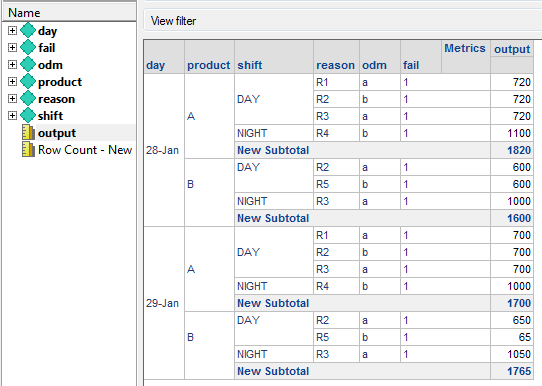
As the example below, attribute day, product and shift determine a unique output value. Attribute shift has parent-child relationship with reason, which means there can be more than one reason under one shift.
When calculate the subtotal, for same shift, the output is calculated repeatedly.

This article describes how to show distinct total value via setting distinct subtotal with across level in Strategy Developer.
Steps:
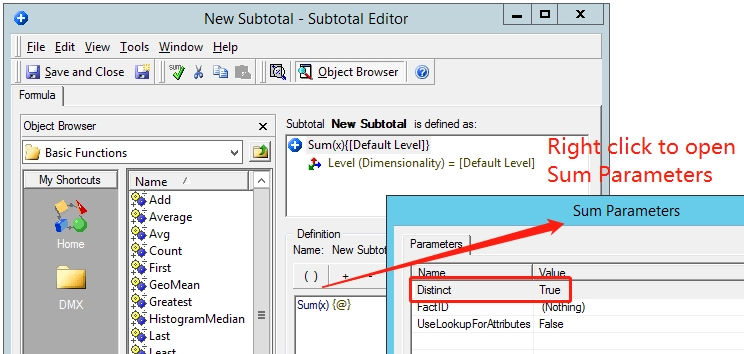
1. Create a New Subtotal, right click the Sum function to open Sum Parameters, and then set the Distinct value as True.Please note that the changes to this object will not be visible until the cube republished.
2. Edit metric output, go to Subtotals / Aggregation tab, drag the new created subtotal in step 1 to the Available subtotals for metric, and then publish the cube to take effect.

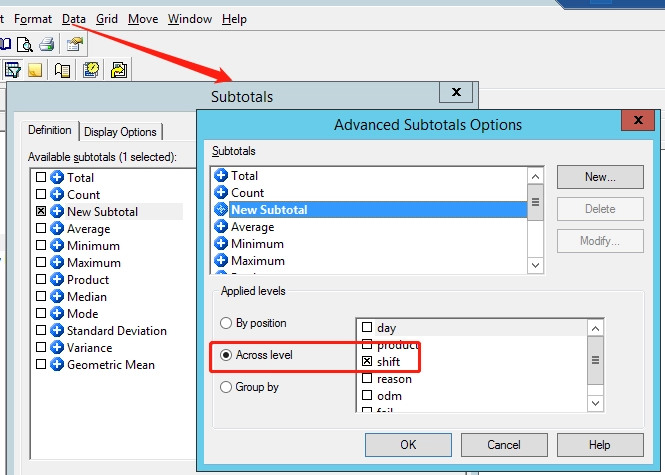
3. Edit report, click Data and check New Subtotal. In Advanced Subtotals Options select shift as Across level, click OK to save it.
The report returns correct subtotal as below. Under same shift, the output is not sum repeatedly.