EducationSoftwareStrategy.com
StrategyCommunity

Knowledge Base

Product

Community

Knowledge Base

TopicsBrowse ArticlesDeveloper Zone

Product

Download SoftwareProduct DocumentationSecurity Hub

Education

Tutorial VideosSolution GalleryEducation courses

Community

GuidelinesGrandmastersEvents
x_social-icon_white.svglinkedin_social-icon_white.svg
Strategy logoCommunity

© Strategy Inc. All Rights Reserved.

LegalTerms of UsePrivacy Policy
  1. Home
  2. Topics

KB484548: How to show preview images in recent dossiers when using My Page as the start page in MicroStrategy Web 2019 and later


Mengran (Molly) Wang

Senior Cloud Support Engineer III • MicroStrategy


This article explains how to enable preview images for recent dossiers when My Page is set as the start page in MicroStrategy Web 2019 and later.

Starting with the release of Strategy ONE (March 2024), dossiers are also known as dashboards.

Description 


When setting "My Page" as the default start page in Web Preferences, the thumbnails for recent dossiers on the start page appear as "No preview image available."
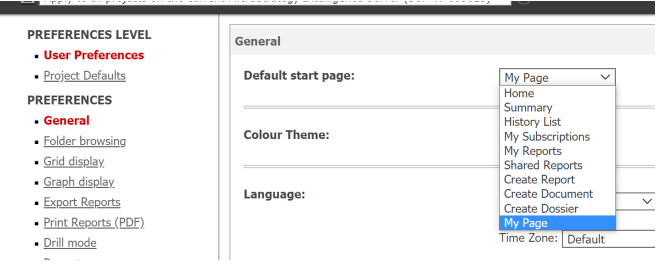
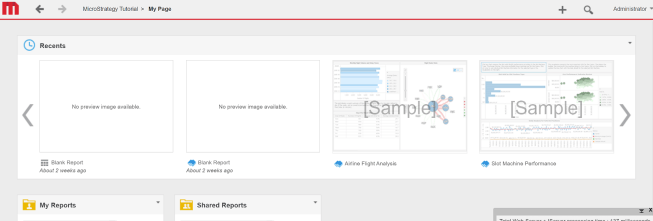
ka0PW0000001JdWYAU_0EM4W000001IZIe.jpeg
ka0PW0000001JdWYAU_0EM4W000001IZIj.jpeg

Solution


To enable preview images, please refer to the following steps.
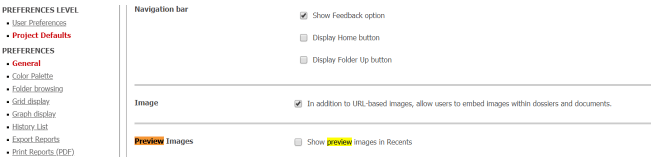
  • Go to Web Preferences > Project Defaults > General > Preview Images.
  • Select the Show preview images in Recents checkbox.
ka0PW0000001JdWYAU_0EM4W000001IZK1.jpeg

Newly added dossiers will have a preview in Recents.
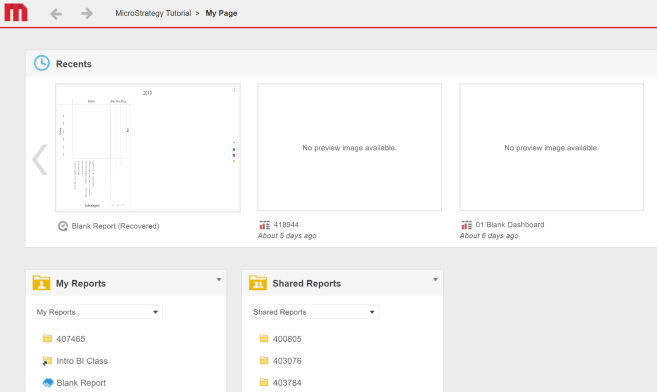
ka0PW0000001JdWYAU_0EM4W000001IZKG.jpeg

Please note that: 

  • This setting is effective for dossiers added afterwards. For the dossiers before the setting was enabled, the preview still cannot be loaded.
  • If you stay shortly on the dossier page before closing it, like 2 seconds, then the preview image will not be generated nor displayed.
  • The “Recents” list is stored in the browser cache. If you clear the browser cache, use incognito mode, or switch to another browser, the “Recents” list will get cleared.

Comment

0 comments

Details

Knowledge Article

Published:

September 2, 2020

Last Updated:

March 21, 2024