EducationSoftwareStrategy.com
StrategyCommunity

Knowledge Base

Product

Community

Knowledge Base

TopicsBrowse ArticlesDeveloper Zone

Product

Download SoftwareProduct DocumentationSecurity Hub

Education

Tutorial VideosSolution GalleryEducation courses

Community

GuidelinesGrandmastersEvents
x_social-icon_white.svglinkedin_social-icon_white.svg
Strategy logoCommunity

© Strategy Inc. All Rights Reserved.

LegalTerms of UsePrivacy Policy
  1. Home
  2. Topics
  3. KB484697: How to use the ApplyX function without the "Use FreeForm SQL Report" privilege

KB484697: How to use the ApplyX function without the "Use FreeForm SQL Report" privilege


Colleen Song

Content Engineer • Strategy


This article addresses the error encountered when saving a dossier containing an embedded metric with an ApplyX function defined. This article also provides workarounds to avoid this error.
Starting with the release of MicroStrategy ONE (March 2024), dossiers are also known as dashboards.

Description

If an embedded metric with an ApplyX function is defined as part of a dossier object, the "Use Freeform SQL Editor" privilege is required to save the dossier, even if you only perform some normal editing WITHOUT modifying the ApplyX metric.
If you do not have the appropriate privilege, you receive the following error. 
You do not have Use Freeform SQL Editor privilege(s) to perform the task. 
This is a designed security enhancement in MicroStrategy 2020. For more information about the Apply (Pass-Through) functions, please refer to Apply (Pass-Through) Functions.


Why is this happening? 

For security concerns, MicroStrategy only allows users who have the Use Freeform SQL Editor privilege to save the dossier using metrics with the ApplyX function. 
This leads to a situation where every user requires architect privilege to edit and save dossiers containing ApplyX metrics, even if they are NOT editing the ApplyX function. 


Workaround 1

Use the Administrator or Architect with the Use Freeform SQL Editor privilege to build a standalone metric containing ApplyX functions. Replace the embedded filter or derived metric with ApplyX functions with the newly created standalone metric.  
To get all the documents/list that have embedded filters or metrics built with ApplyX functions, you can run the following SQL: select info.project_id, info.object_name from dssmdobjinfo info, dssmdobjdepn depn where info.project_id = depn.project_id and info.object_id = depn.object_id and depn.object_type = 55 and depn.depn_objid in ('8107C340DD9911D3B98100C04F2233EA', '8107C341DD9911D3B98100C04F2233EA', '8107C342DD9911D3B98100C04F2233EA', '8107C343DD9911D3B98100C04F2233EA', '8107C344DD9911D3B98100C04F2233EA', '030CA72184E84AB4A3537E861101D50D', '3A257914A153468384320E8DB7FD338B')

Workaround 2Note: This workaround can only be applied in MicroStrategy versions 2021 and later. 
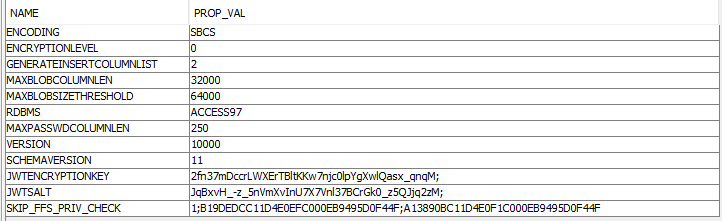
 Insert property SKIP_FFS_PRIV_CHECK to table DSSMDSYSPROP. 
ka0PW0000001JgPYAU_0EM4W000001JZeT.jpeg

The property SKIP_FFS_PRIV_CHECK is a flag used to control whether to skip the check for the “Use Freeform SQL Editor” privilege when saving a dossier. This flag has nothing to do with compliance check logic.
 

If the customer's environment is out-of-compliance, it is because the number of users that use the Architect license (“Use Freeform SQL Editor” privilege belongs to "Architect" in MicroStrategy 2021) exceeds the limit. Inserting property SKIP_FFS_PRIV_CHECK to table DSSMDSYSPROP will not solve this out-of-compliance issue. They need to revoke this privilege manually.

The content of this property is a semicolon-delimited string, "ProjectListType;PROJECT1;PROJECT2;PROJECT3"

ProjectListType is defined as below. 


ProjectListType

Description

1

Acceptlist of project.
The Intelligence Server won't enforce the "Use Freeform SQL Editor" privilege for the end-users who are using ApplyX functions in these projects, and will enforce the privilege for all other projects. 

2

Blocklist of project. 
The Intelligence Server will enforce the "User Freeform SQL Editor" privilege for the end-users who are using ApplyX functions in these projects, and won't enforce this privilege for all other projects. 

All others

The Intelligence Server behaves as normal, which is to enforce the "Use Freeform SQL Editor" privilege for all the projects. 


The following are sample SKIP_FFS_PRIV_CHECK property values.
 

Sample

Description 

Behavior

1;ABC***F;DEF***F;

Assigned two projects to allow list

Intelligence Server will not enforce the "Use Freeform SQL Editor" privilege for project "ABC***F" and "DEF***F"

1

No project in allow list

Intelligence Server will enforce the “Use Freeform SQL Editor“ privilege for all other projects

2;ABC***F;DEF***F;

Assigned two projects to block list

Intelligence Server will enforce the “Use Freeform SQL Editor“ privilege for project “ABC***F” and “DEF***F“

2

No project in block list

Intelligence Server will not enforce the “Use Freeform SQL Editor“ privilege for any other projects

2;

No project in block list

Intelligence Server will not enforce the “Use Freeform SQL Editor“ privilege for all other projects

3;ABC***F;DEF***F;

Illegal format

Intelligence Server behaves as normal, which is to enforce the “Use Freeform SQL Editor“ privilege for all the projects

3

Illegal format

Intelligence Server behaves as normal, which is to enforce the “Use Freeform SQL Editor“ privilege for all the projects


Workaround 3

Note: This workaround can only be applied in versions starting in MicroStrategy 2021 Update 1 and MicroStrategy 2020 Update 4.
 

We migrated the privilege “Use Freeform SQL Editor” from the “Architect“  license to the “Server_Intelligence“ license in MicroStrategy 2021 Update 1 and MicroStrategy 2020 Update 4. You can grant this privilege to the user and it won't occupy an Architect license. Although it is listed under "Client-Architect" in the User editor, it is mapped to the Intelligence license when the Intelligence Server does a compliance check.
 

Since M2021 U8, this privilege is grouped to “Server-Intelligence“ in User Editor in all Clients.


Comment

0 comments

Details

Knowledge Article

Published:

March 21, 2024

Last Updated:

March 21, 2024