As of 2019 Update 2, HyperIntelligence allows you to create contextual links. Contextual links allow you to navigate to different URLs based on your keyword attribute form.
Contextual links appear in the form of https://www.example.com/{keyword@form}. The URL you decide to use should match the exact page you're trying to navigate to. You can also have a corresponding URL icon. If you are linking to Workday, for example, you can select the Workday icon in the Link from Text dialog.
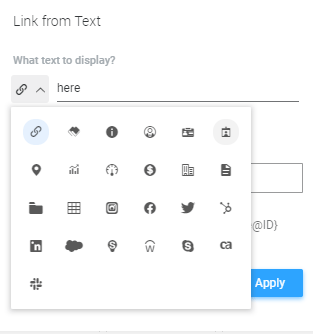
Below are a series of examples of contextual URLs. To create contextual links, you must have a multi-form keyword attribute. See How to Add Contextual Links for exact steps.
1. You have a card about YouTube channels. Your keyword attribute is the attribute YouTube. It is a multi-form attribute, one is the the YouTube channel ID. You want to create a link that, depending on what YouTube channel is displayed on the card, will link to the correct YouTube channel.
You would add the URL https://www.youtube.com/channel/{Youtube@channelID}.
If one of the channelIDs is UCeMr7Ji0skwzjp5D21BOO6Q, the URL will redirect to the Strategy YouTube channel.
2. You have an employee card at your company. You want to include a link to each employee's Workday account on your card. Your keyword attribute is the attribute Employee. It is a multi-form attribute, one of its forms is workdayID.
You would add the URL https://wd5.myworkday.com/company/d/inst/{Employee@workdayID}.htmld.
3. You created a Defects card. Your keyword attribute is the Defect attribute, which contains data from Rally. You want to have a link to Rally that will display the discussion of each defect. In this situation, you would want to add two attribute forms--the projectID form and the defectID form--because of the way the Rally URL is set up.
So you would add the URL https://rally1.rallydev.com/#/{Defect@projectID}/detail/defect/{Defect@defectID}/discussion.
4. You created a card about Instagram. Your keyword attribute is Posts, which contains data about Instagram posts. Instead of just linking to Instagram in the URL, you want the URl to redirect users to the specific post on Instagram. One of the keyword attribute forms is postID.
You would add the URL https://www.instagram.com/p/{Posts@postID}/. If one of the postIDs is BxNbBPlBq0c, then the link would redirect to a post from the Strategy Instagram.
For more ways to optimize your cards, see How to Optimize a HyperIntelligence Dataset.
KB483289
