Starting with the release of Strategy ONE (March 2024), dossiers are also known as dashboards.
SYMPTOM:
In Strategy Web, users can configure textboxes as hyperlinks in Dossier. In previous versions of Strategy, the hyperlink automatically opened in a new window when clicking on the textbox. This was the behavior in both Editable and Presentation mode.
In Strategy Web 2019, the hyperlink does not automatically open in a new window when clicking on the textbox in Editable mode. Instead, a menu appears prompting the user to either go to the URL or edit the text of the textbox as seen below.
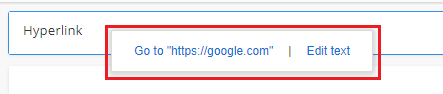
This behavior is specific to Editable mode. If the Dossier is run to Presentation mode, the hyperlink automatically opens in a new window.
STEPS TO REPRODUCE:
CAUSE:
This is working as designed in Strategy Web 2019. This behavior was a design change made on purpose based on other interface designs such as Google Sheets. This prevents users from accidentally clicking on hyperlinks when instead they meant to do an editing operation.
ACTION:
This issue was reviewed by our Technology team for feasibility and will not be scoped for a code fix in any upcoming Strategy release.
The Strategy Internal Reference Number for this issue is: KB483032
