Starting with the release of Strategy ONE (March 2024), dossiers are also known as dashboards.
Troubleshooting
If AppLocker is used and cefSharp Subprocess is not whitelisted, multiple Workstation sections appear blank
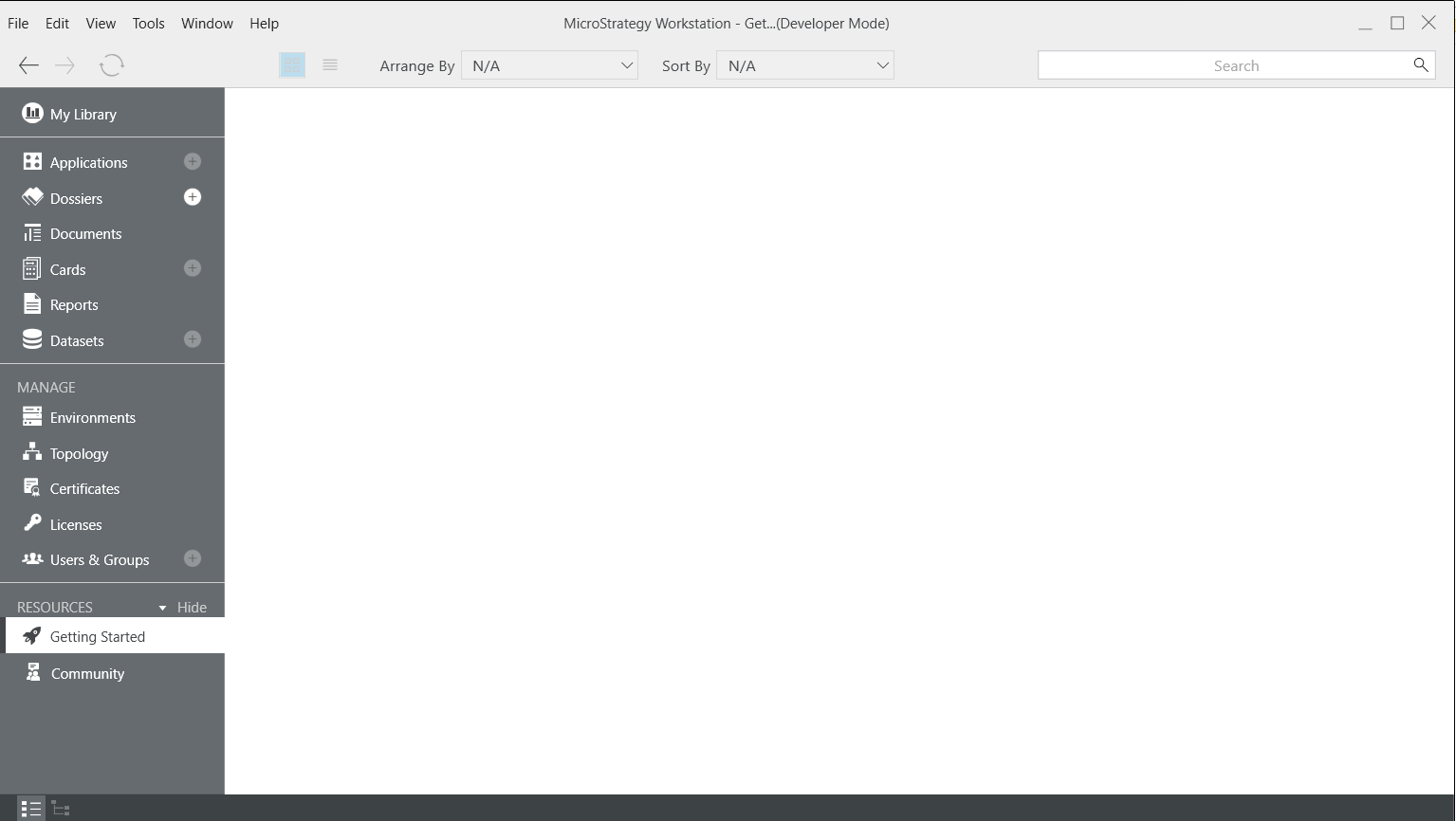
Some of our Strategy users have reported that a few screens on Workstation were showing up with blank screens. These pages include the "Getting Started, "Activity Data for Applications or Other Objects", "Licenses", etc. The pages were applicable to the PA Dossier in Workstation. Our team has come to the conclusion that this issue is due to the fact that users have added security while using AppLocker. AppLocker comes with Windows Enterprise Version. Administrators can add rules to whitelist the applications that can be run on the given system. If only Workstation.exe is whitelisted, some features on Workstation Windows will not work. One of the examples that displays this issue is the "Getting Started" page under Resources in Workstation.
See the image below to view how the page appears to users.
Note: Here is the view of "Getting Started" blank page.
Steps to reproduce
Note: Check out this GIF to help you better understand how AppLocker works and what may have gone wrong with the pages. In this GIF, our users have taken the correct steps to whitelist all of the entire Workstation folder. If you run into the blank page on Workstation, you most likely only selected workstation.exe, or only one part of the folder. All of the subprocesses must be whitelisted to gain full functionality.
Why this is happening?
One possible of this issue is the specific corporate security policy implemented by AppLocker. With this security policy, the user has whitelisted only workstation.exe. Workstation Windows uses subprocesses for various features. If all of the subprocesses are not whitelisted, the features will not work on Workstation Windows. For all the features to work properly, the whole Workstation installation folder should be whitelisted.
Reference for AppLocker:
https://docs.microsoft.com/en-us/windows/configuration/lock-down-windows-10-applocker
If the problem persists, log a support ticket regarding this logical defect to Strategy Support team and attach the DSSErrors.log file. "yyyy-mm-dd"Oracle Database" (quote)Date "dd-mm-yyyy" Time "yyyy-mm-dd hh:nn:ss"Microsoft SQL Server[ ] (square bracket) Note: if the identifier uses character ], you can escape by using ]]in your SQL statement.Date "yyyy-mm-dd" Time "hh:nn:ss.0000000" TimeStamp "yyyy-mm-dd hh:nn:ss.0000000"Amazon Redshift" (quote)Date “yyyy-mm-dd"IBM DB2" (quote) PosgreSQL" (quote)Date "yyyy-mm-dd"Azure Synapse Analytics[ ] (square bracket)Date "yyyy-mm-dd"Exasol" (quote)Date "yyyy-mm-dd"Oracle MySQL` (backtick)Date "yyyy-mm-dd"SAP HANA" (quote)Date "yyyy-mm-dd" Time "yyyy-mm-dd hh:nn:ss"Google BigQuery` (backtick)Date "yyyy-mm-dd"Snowflake" (quote) Use AppLocker to create a Windows 10 kiosk that runs multiple apps (Windows 10) | Microsoft Docs Use AppLocker to create a Windows 10 kiosk that runs multiple apps. 07/30/2018; 4 minutes to read; Contributors. In this article. Applies to. Windows 10; Learn how to configure a device running Windows 10 Enterprise or Windows 10 Education, version 1703 and earlier, so that users can only run a few specific apps. Source: docs.microsoft.com | If the problem persists, log a support ticket regarding this logical defect to Strategy Support team and attach the DSSErrors.log file. "yyyy-mm-dd"Oracle Database" (quote)Date "dd-mm-yyyy" Time "yyyy-mm-dd hh:nn:ss"Microsoft SQL Server[ ] (square bracket) Note: if the identifier uses character ], you can escape by using ]]in your SQL statement.Date "yyyy-mm-dd" Time "hh:nn:ss.0000000" TimeStamp "yyyy-mm-dd hh:nn:ss.0000000"Amazon Redshift" (quote)Date “yyyy-mm-dd"IBM DB2" (quote) PosgreSQL" (quote)Date "yyyy-mm-dd"Azure Synapse Analytics[ ] (square bracket)Date "yyyy-mm-dd"Exasol" (quote)Date "yyyy-mm-dd"Oracle MySQL` (backtick)Date "yyyy-mm-dd"SAP HANA" (quote)Date "yyyy-mm-dd" Time "yyyy-mm-dd hh:nn:ss"Google BigQuery` (backtick)Date "yyyy-mm-dd"Snowflake" (quote) Use AppLocker to create a Windows 10 kiosk that runs multiple apps (Windows 10) | Microsoft Docs Use AppLocker to create a Windows 10 kiosk that runs multiple apps. 07/30/2018; 4 minutes to read; Contributors. In this article. Applies to. Windows 10; Learn how to configure a device running Windows 10 Enterprise or Windows 10 Education, version 1703 and earlier, so that users can only run a few specific apps. Source: docs.microsoft.com |
Status
ACKNOWLEDGED IN-PROGRESS SOLVED (Version: Strategy 2019)
Next Steps
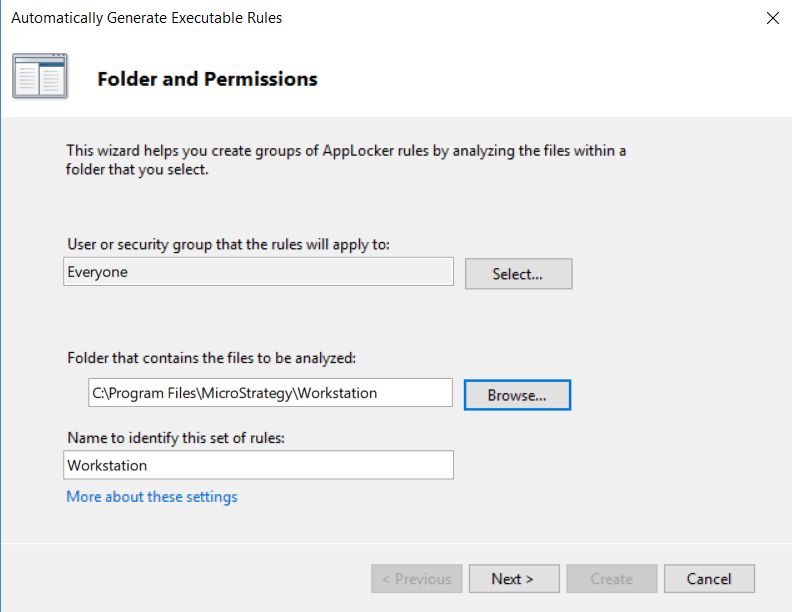
For all the features to work properly, ensure that you whitelist the entire Workstation installation folder. To review the AppLocker steps, refer to the GIF above. Once at the Folder and Permissions screen, make sure to choose the following folder that contains:
C:\Program Files\Strategy\Workstation. View the image before for more details.
With that, all pages should be working properly.
This issue has been classified as a defect by Strategy. The specific issue is related to the machine configuration. That being said, this will affect the previous releases of Strategy 2019 and Update 2 at this moment. Our team is working to make this process easier for users to configure and to improve our error messages for a more user-friendly interface. With improved messaging, users will know what steps to take when reaching a blank page.
Have other questions? Feel free to start a discussion or reach out to your Support liaison to open a case!
