Starting with the release of Strategy ONE (March 2024), dossiers are also known as dashboards.
In most cases when you search for reports or dossiers you want to search by object name. Some users, though, prefer having #tags as a secondary way of providing additional information about objects. Tags like #Finance or #Customer can be very handy in case there are hundreds of reports and dashboards in your environment.
Main characteristics of the solution are listed below:
- Tags, like #executive or #customer will be added to object description field

- Python script will be periodically checking all objects descriptions and updating the cube that stores this data
- Hyper card based on the cube can be used to search for objects. Search results are split between a) Main search on object name (highlighted with yellow color below) b) Alternate keyword search on tags (marked with orange color)
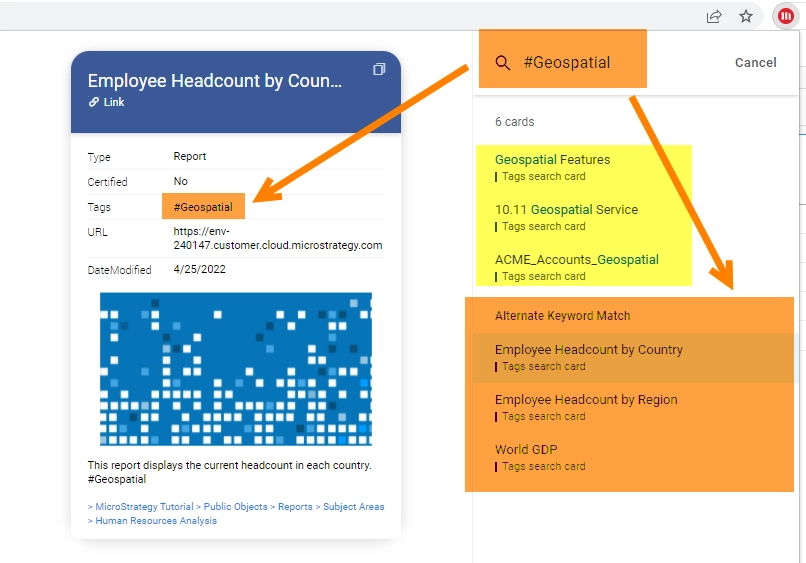
- Hyper card displays the main information about each object as well as a contextual link that leads to the object.

Attached to this example are:
- two files with Python code (.py and Jupyter Notebook format)
- cube_id.pkl - this file will store ID of your cube
- TAGS_cube_structure.json - this file contains JSON file that constitutes cube structure. The cube will be used by hyper cards and hyper cards have special requirements towards cube design (multiform attributes, data types). This is the reason we cannot just use mstrio to push the data - a custom cube design is needed.
Please note - I've added color formatting in the code below (http://hilite.me/). Code copied from here might not work due to indentation issues. In that case, use attached file with sample code. Also this CRM is adding ';' after URLs.
#!/usr/bin/env python
# coding: utf-8

# In[ ]:


# This script will help establishing "tagging" functionality in Strategy
# Author: Robert Prochowicz
# Date: 2022-04-25
# Tested with Strategy 2021 u.4 and mstrio 11.3.3.102
# Update parameters in PARAMETERS section

from mstrio.connection import Connection
from mstrio.project_objects.dossier import list_dossiers
from mstrio.project_objects.report import list_reports
from mstrio.project_objects.document import list_documents
from mstrio.project_objects.datasets.super_cube import SuperCube
from time import sleep
import pandas as pd
import re, requests
#import base64
import csv, getpass, pickle

# Credentials
mstr_username = "mstr"
mstr_password = getpass.getpass(prompt='Password ')

# PARAMETERS
mstr_base_url = "https://env-XXXXXX.customer.cloud.Strategy.com"
mstr_url_api  = mstr_base_url+"/MicroStrategyLibrary/api"
mstr_project_id = "B7CA92F04B9FAE8D941C3E9B7E0CD754" # this one will be scanned for objects
mstr_login_mode = 1 # Login mode (1 - Standard, 16 - LDAP)
folder_ID = '23C0964DB640DDC3EF9F42A63E4A81AA' # target location for your TAGS cube
tags_cube_structure_file="TAGS_cube_structure.json"
pickle_file="cube_id.pkl"
column_names=["ID","Name","Name2","Description","DateModified","Path","Type","Certified","IconPath","URL",
              "Tag","TagsAll","TagsAll2","TagName"]
interv=60      # how often should the TAGs cube being refreshed (in seconds)

# Parameters for Web Server URL
ws_port=443
iserver_name="10.254.112.XXX"
project_name="Strategy Tutorial"
iserver_port="39321"


# ### Functions

# In[ ]:


def create_cube(connection,cube_structure_json):
    r = connection.session.post(url=connection.base_url + "/api/datasets",
                                headers={'Content-Type': 'application/json'},
                                data=cube_structure_json)
    if r.ok:
        print("Error: " + str(r.raise_for_status()) + "   ||   HTTP Status Code: " + str(r.status_code))
        print("\nCube CREATED successfully")
        print("Cube ID:     " + r.json()['datasetId'])
        print("\nCube ID is saved to pickle file")
    else:
        print("HTTP %i - %s, Message %s" % (r.status_code, r.reason, r.text))
    return r.json()['datasetId']

def process_objects(obj_list, tags_list, obj_type):
    hashtag='#'
    tagRegex = re.compile(r'('+hashtag+'\S+)')
    object_found=[] # this list stores details about identified reports/dossiers

    for d in obj_list:
        # This will be useful when cube upload starts supporting HTML TAG data type
        #if d.icon_path:
        #    icon_path=f'<IMG SRC="{d.icon_path}">'
        #else:
        #    icon_path="https://demo.Strategy.com/MicroStrategy/images/Coverpages/16-9/46.jpg"

        icon_path="https://demo.Strategy.com/MicroStrategy/images/Coverpages/16-9/46.jpg"
        descr=str(d.description)

        # Get Modification date
        # we need to remove time zone from the end of the string '2022-02-01 10:56:19+00:00'
        dm=str(d.date_modified)[:-15]

        # get certification info
        if d.certified_info:
            certl=str(d._certified_info)
            if certl=="Object is not certified.":
                cert="No"
            else:
                cert="Yes"
                descr+=f" ====== {certl}" # add certification details to the description

        # get URL
        if obj_type=="Report":
            # Reports get Web Server URL
            url=f"{mstr_base_url}:{ws_port}/MicroStrategy/servlet/mstrWeb?evt=4001&src=mstrWeb.4001&reportID="
            url+=f"{d.id}&Server={iserver_name}&Project={project_name}&Port={iserver_port}&share=1"
        else:
            # Documents and Dossiers get Library URL
            url=f"{mstr_base_url}/MicroStrategyLibrary/app/{mstr_project_id}/{d.id}/share"

        # Get path to object
        path='||>'
        if d.ancestors:
            for i in range(len(d.ancestors)):
                path= path+' > '+(d.ancestors[i]['name'])

        # add all the found details to the list of objects
        object_new=[d.id,d.name,d.name,descr,dm,path[4:],obj_type,cert,icon_path,url]
        object_found.extend([object_new])

    print(f"{obj_type} Objects found: {len(object_found)}")

    # Additionally transform the list of objects; duplicate object entry for each identified TAG
    # If dossier has 3 tags there will be 3 lines for this dossier in tags_list
    for d in object_found:
        tags=['']
        if d[3]:
            tags = tagRegex.findall(d[3])
        if not tags:
            tags=['__no_tags']

        for t in tags:
            dd=d[:]
            dd.append(t) # adds one tag
            dd.append(" ".join(tags)) # adds all tags as one string
            dd.append(" ".join(tags)) # adds all tags as one string, second time (needed for hyper card design)
            dd.append(f"{t} | {d[1]}") # adds "one tag + object name" (needed for hyper card design)
            tags_list.extend([dd])
    return tags_list

def get_objects_data(mstr_connection):
    tags_list=[] # tags_list is a list that collects information about each dossier and attached tags
    tags_list=process_objects(list_dossiers(mstr_connection), tags_list, "Dossier")
    tags_list=process_objects(list_documents(mstr_connection), tags_list, "Document")
    tags_list=process_objects(list_reports(mstr_connection), tags_list, "Report")
    return tags_list

def save_csv(tags_list): # Export results to CSV file
    df = pd.DataFrame(tags_list)
    df.columns =column_names
    df.to_csv('tags_export.csv', index=False, encoding='utf-8', sep=",",
              quoting=csv.QUOTE_ALL, escapechar="\\", header=True)

def push_to_cube(mstr_connection,cube_id,column_names,tags_list):
    df_tags_list = pd.DataFrame(tags_list)
    df_tags_list.columns =column_names

    mstr_dataset = SuperCube(mstr_connection, id=cube_id)
    mstr_dataset.add_table(
      name="TAGS_table",
      data_frame=df_tags_list,
      update_policy="replace",
      to_metric=None,
      to_attribute=column_names
    )
    mstr_dataset.update()

def main(cube_id, interv):
    choice = None
    while choice != "0":
        print         ("""
        ---MENU---

        0 - Exit
        1 - Create a Cube
        2 - Single data push
        3 - Start data refresh cycle
        """)

        choice = input("Your choice: ") # What To Do ???
        print()
        if choice == "0":
            print("Good bye!")
        elif choice == "1":
            with open (tags_cube_structure_file, "r") as myfile:
                cube_json=myfile.read()
            cube_json=" ".join(cube_json.split())
            # replace folder ID with your parameter value
            cube_json=cube_json[:-35]+ folder_ID+'"}'
            # create cube
            cube_id=create_cube(mstr_connection,cube_json)
            # save new cube ID to pickle file
            f = open(pickle_file,"wb")
            pickle.dump(cube_id,f)
            f.close()
        elif choice == "2":
            print("Reseting Cube")
            tags_list=get_objects_data(mstr_connection)
            push_to_cube(mstr_connection,cube_id,column_names,tags_list)
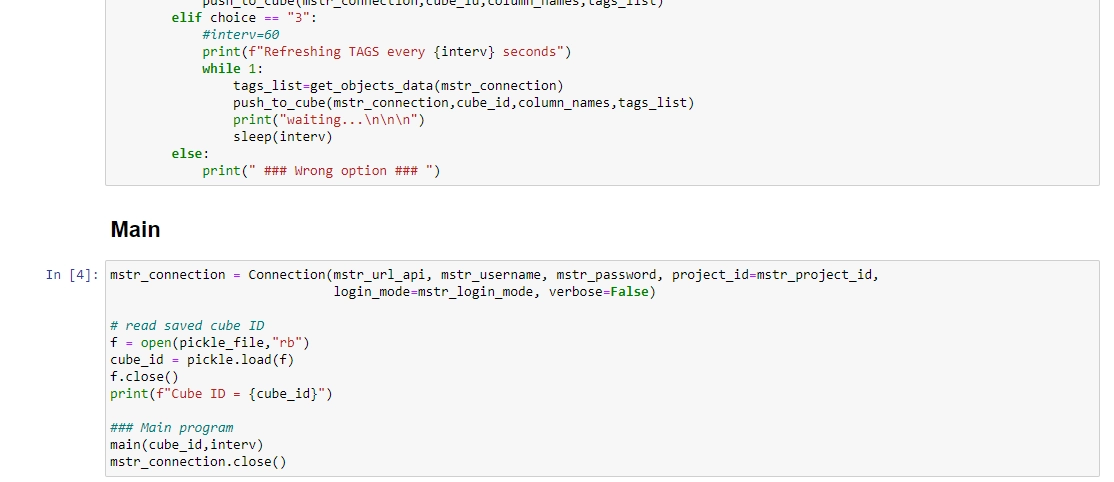
        elif choice == "3":
            #interv=60
            print(f"Refreshing TAGS every {interv} seconds")
            while 1:
                tags_list=get_objects_data(mstr_connection)
                push_to_cube(mstr_connection,cube_id,column_names,tags_list)
                print("waiting...\n\n\n")
                sleep(interv)
        else:
            print(" ### Wrong option ### ")


# ## Main

# In[ ]:


mstr_connection = Connection(mstr_url_api, mstr_username, mstr_password, project_id=mstr_project_id,
                             login_mode=mstr_login_mode, verbose=False)

# read saved cube ID
f = open(pickle_file,"rb")
cube_id = pickle.load(f)
f.close()
print(f"Cube ID = {cube_id}")

### Main program
main(cube_id,interv)
mstr_connection.close()


# In[ ]:
