EducationSoftwareStrategy.com
StrategyCommunity

Knowledge Base

Product

Community

Knowledge Base

TopicsBrowse ArticlesDeveloper Zone

Product

Download SoftwareProduct DocumentationSecurity Hub

Education

Tutorial VideosSolution GalleryEducation courses

Community

GuidelinesGrandmastersEvents
x_social-icon_white.svglinkedin_social-icon_white.svg
Strategy logoCommunity

© Strategy Inc. All Rights Reserved.

LegalTerms of UsePrivacy Policy
  1. Home
  2. Topics

KB484321: Import files with file:// protocol in Linux Intelligence Server


Rong Yu

Quality Engineer, Senior • MicroStrategy


This article provides instructions for mounting Windows files under a Linux Intelligence Server machine.

Description 


For Intelligence Servers on Linux machines, Strategy can only access files with the

file:// 
protocol in localhost machine. If you want to access and import files of Windows or other Linux machines, the workaround is to mount the file folder to your Linux I-Server machine.
 

Solution

Mount Windows files folder to Linux I-Server machine

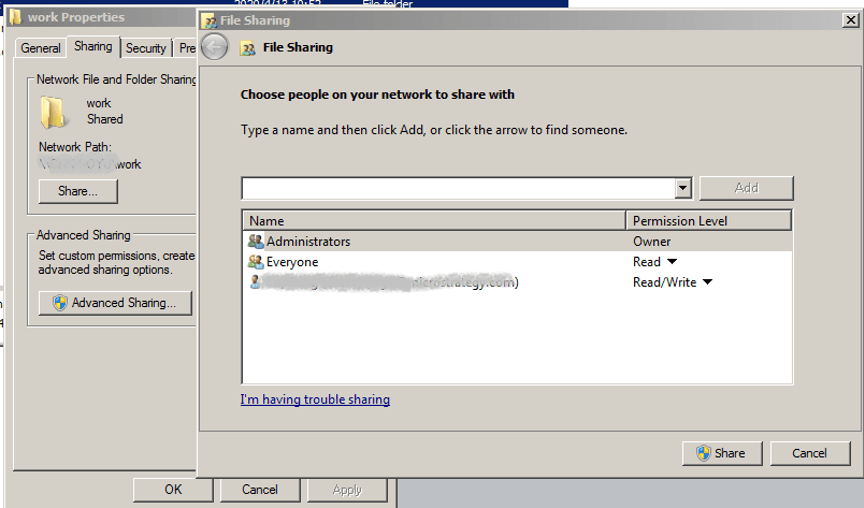
  • Share windows folder to some users, like the following: 
ka02R000000bsdLQAQ_0EM2R000000frUY.jpeg
  • Run a command to make a folder under the root path of your Linux machine, like the following:
    
    mkdir <folder name>

     
  • Run a command to mount Windows folder in Linux, like the following:
    
    sudo mount -t cifs //<Windows Machine IP>/work /<folder name> -o username=<user name>,password=<user password>,vers=2.0

     
  • Set Allowed URLs and import files from Data from URL:
    • For 11.2.x:
      • Set Allowed URLs with
        file://*
      • Files in Linux machine can be imported.
    • For 11.3 and later
      • Set Allowed URLs, e.g.,
         file:///<folder name>
        /
        , then you can access files only under
        /.
      • Input URL and file imported:
        file:///<folder name>
        /<file name>
        , or import files from Network Browser.
      • Input URL but failed, e.g:
        file:///opt/XXX.

Comment

0 comments

Details

Knowledge Article

Published:

June 7, 2020

Last Updated:

June 7, 2020