EducationSoftwareStrategy.com
StrategyCommunity

Knowledge Base

Product

Community

Knowledge Base

TopicsBrowse ArticlesDeveloper Zone

Product

Download SoftwareProduct DocumentationSecurity Hub

Education

Tutorial VideosSolution GalleryEducation courses

Community

GuidelinesGrandmastersEvents
x_social-icon_white.svglinkedin_social-icon_white.svg
Strategy logoCommunity

© Strategy Inc. All Rights Reserved.

LegalTerms of UsePrivacy Policy
  1. Home
  2. Topics

KB441489: In MicroStrategy 10.11 using Live connection to Hadoop Gateway, "Data source name not found and no default driver specified" error occurs when adding attribute to grid.


Community Admin

• Strategy


This Knowledge Base articles discusses an error encountered when connecting live to Hadoop Gateway in MicroStrategy 10.11.

SYMPTOM:
In Strategy 10.11, when doing Live Connect using the Hadoop Gateway, the following error is encountered when pulling an attribute into the grid.


"Data source name not found and no default driver specified"
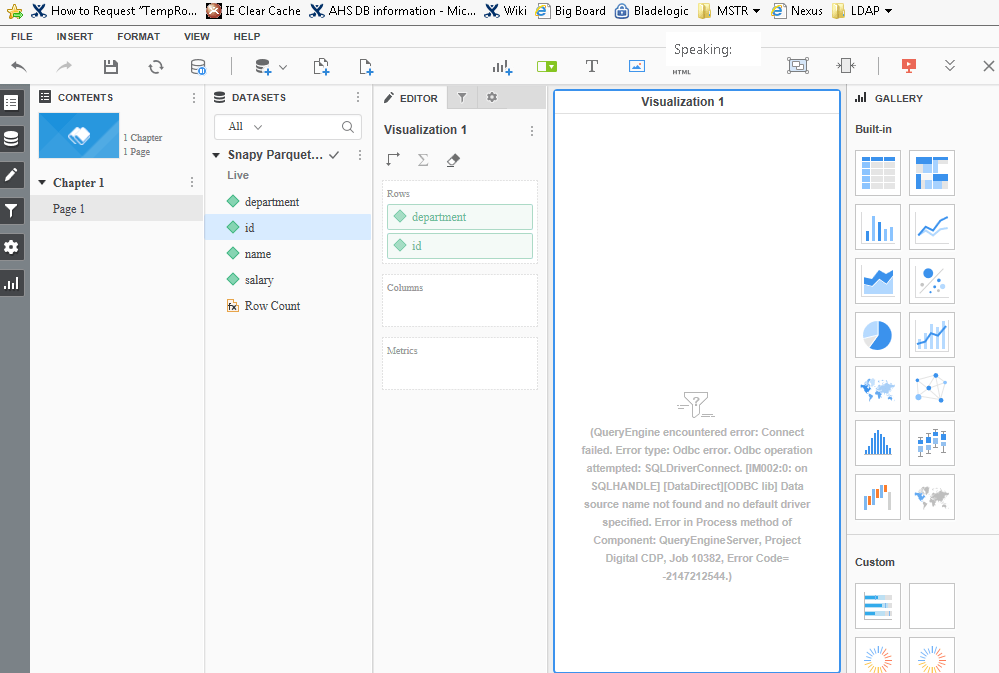
ka04W00000148GxQAI_0EM44000000WgY3.png

 
The following errors are seen when Hadoop Gateway Connect live fails in the DSSErrors.log:


2018-07-30 13:07:16.461-06:00 [HOST][SERVER:CastorServer][PID:9532][THR:139792379242240][Engine][Error][0x80042803][UID:3AC1D50211E76641CFFB0080EF757A79][SID:63A6BAFC882ED7D9463D46EE396A65B9][OID:4802DE4C4C18F434C75BFA84EC8A5E4B] Type-mapping table not found, database type: [1]
2018-07-30 13:07:16.482-06:00 [HOST][SERVER:CastorServer][PID:9532][THR:139791440086784][Database Classes][Error][UID:3AC1D50211E76641CFFB0080EF757A79][SID:63A6BAFC882ED7D9463D46EE396A65B9][OID:646DE4E811E8942365FE0080EF251BF4] Connect failed.
Error type: Odbc error. Odbc operation attempted: SQLDriverConnect. [IM002:0: on SQLHANDLE] [DataDirect][ODBC lib] Data source name not found and no default driver specified Connection String: HADOOPNAME=xxx;HDFSPORT=8020;WEBHDFSPORT=50470;BDEIP=xxx;BDEPORT=30004;AUTHMODE=ANONYMOUS;PROTOCOL=HTTP;HADOOPNAMESERVICE=nameservice1;UID=;.T

 
CAUSE: This was an identified defect in Strategy 10.11 and has been logged to our Technology team. Because Technology was not able to reproduce issue it was not fixed.
Action: Potentially issue can be resolved by creating a fresh blank 10.11 metadata, doing project duplication and then connecting to Hadoop Gateway.
 
KB441489


Comment

0 comments

Details

Knowledge Article

Published:

August 7, 2018

Last Updated:

September 20, 2021