EducationSoftwareStrategy.com
StrategyCommunity

Knowledge Base

Product

Community

Knowledge Base

TopicsBrowse ArticlesDeveloper Zone

Product

Download SoftwareProduct DocumentationSecurity Hub

Education

Tutorial VideosSolution GalleryEducation courses

Community

GuidelinesGrandmastersEvents
x_social-icon_white.svglinkedin_social-icon_white.svg
Strategy logoCommunity

© Strategy Inc. All Rights Reserved.

LegalTerms of UsePrivacy Policy
  1. Home
  2. Topics

KB440835: In MicroStrategy 10.4, Command Manager script for listing properties for Intelligent Cube Caches returns the error “Intelligent Cube 'X' not found in the specified location path” for MTDI cubes.


Community Admin

• Strategy


This Knowledge Base article addresses an identified defect when getting MTDI cube properties with the Command Manager script “LIST ALL PROPERTIES FOR INTELLIGENT CUBE CACHE NAME "<cube_name>" FOLDER "<location_path>" FOR PROJECT "<project_name>"”.

SYMPTOM:
In Strategy 10.4, the following Command Manager script returns the error “Intelligent Cube 'X' not found in the specified location path" for MTDI cubes (data import cubes).


LIST ALL PROPERTIES FOR INTELLIGENT CUBE CACHE NAME "<cube_name>" FOLDER "<location_path>" FOR PROJECT "<project_name>"
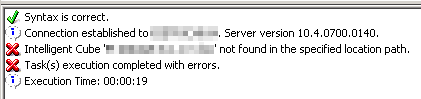
 

ka04W000000OcEyQAK_0EM44000000WO0I.png

 
STEPS TO REPRODUCE:

  • In Command Manager, run the below script to list cube properties for a data import (MTDI) cube.


LIST ALL PROPERTIES FOR INTELLIGENT CUBE CACHE NAME "<cube_name>" FOLDER "<location_path>" FOR PROJECT "<project_name>"

 
CAUSE:
This is an identified defect in Strategy 10.4 and has been logged to our Technology team. The issue lies with the Folder parameter not being able to resolve the location path specified for MTDI cubes. The Strategy Internal Reference number is DE94546.
 
ACTION:
This issue has been addressed in Strategy version 10.11.
 
WORKAROUND:
As a workaround, users can remove the Folder parameter from the script to pull the properties for the MTDI cube.

LIST ALL PROPERTIES FOR INTELLIGENT CUBE CACHE NAME "<cube_name>" FOR PROJECT "<project_name>"

Alternatively, user can use the below script which will return similar information.

LIST ALL PROPERTIES FOR INTELLIGENT CUBE "<cube_name>" IN FOLDER "<location_path>" FOR PROJECT "<project_name>";

  KB440835


Comment

0 comments

Details

Knowledge Article

Published:

May 17, 2018

Last Updated:

May 17, 2018