EducationSoftwareStrategy.com
StrategyCommunity

Knowledge Base

Product

Community

Knowledge Base

TopicsBrowse ArticlesDeveloper Zone

Product

Download SoftwareProduct DocumentationSecurity Hub

Education

Tutorial VideosSolution GalleryEducation courses

Community

GuidelinesGrandmastersEvents
x_social-icon_white.svglinkedin_social-icon_white.svg
Strategy logoCommunity

© Strategy Inc. All Rights Reserved.

LegalTerms of UsePrivacy Policy
  1. Home
  2. Topics

In MicroStrategy 2019, the Compliance Telemetry Dossier does not display Named User Data when a Mixed CPU and Named User License Key are applied


Stephen Vizcarra

Senior Cloud Systems Engineer • MicroStrategy


This article describes an issue with the Platform Analytics out-of-the-box Compliance Telemetry Dossier. This article also discusses a potential workaround for the missing data.

Starting with the release of Strategy ONE (March 2024), dossiers are also known as dashboards.

Description 


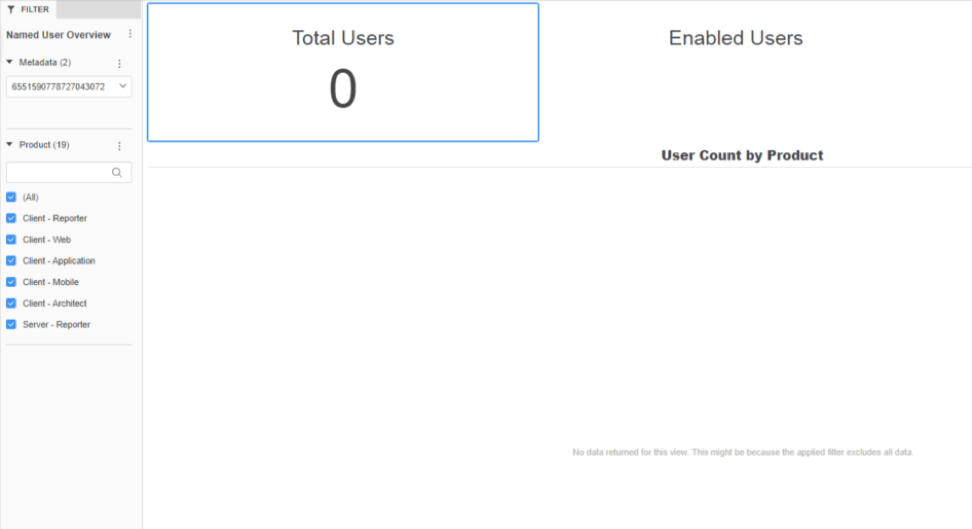
In Strategy 2019, the out-of-the-box Compliance Telemetry Dossier in the Platform Analytics project does not display Named User data when a mixed CPU and Named User License Key is applied.
ka0PW0000001JZ5YAM_0EM2R000000lmBS.jpeg

Steps to Reproduce

  1. Update License Manager with a License Key that is limited by both a Named User count and a CPU count.
  2. Restart the Intelligence Server.
  3. Open License Manager and click the Audit tab. Notice the Named User data is there.
  4. Open the Platform Analytics project in Strategy Web.
  5. In the Utilities folder, refresh the Compliance Telemetry Cube.
  6. Open the Compliance Telemetry dossier. Notice the data is not visible in the dossier.

Why is this happening?


Unlike other out-of-the-box Platform Analytics dossiers, the Compliance Telemetry dossier draws its data from the License Manager auditing process. This causes a problem where a mixed CPU and a Named User License Key are read as a CPU key. As a result, Named User data is not returned on the dossier and only the CPU data is available.
The Strategy implementation that updates the Compliance Telemetry cube from License Manager data will only use Named User data or CPU data, so mixed License Keys will only display CPU data.

Solution 


While Named User data is not available for mixed License Keys in the Compliance Telemetry dossier, it can be viewed in the Audit tab of License Manager. If the Compliance Telemetry dossier is needed to display the data, a non-mixed License Key should be applied. 


Comment

0 comments

Details

Knowledge Article

Published:

August 26, 2019

Last Updated:

March 21, 2024