STEPS TO REPRODUCE:
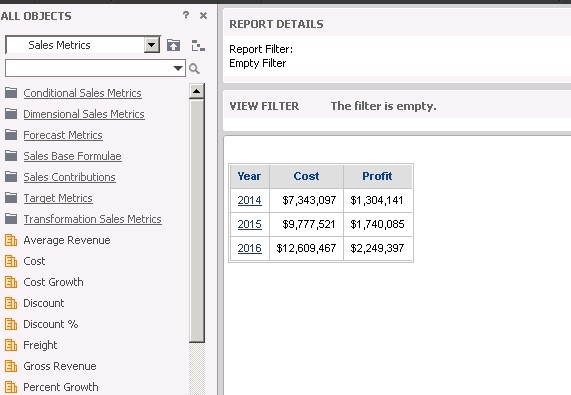
1) Create a report with attribute “Year” and metrics “Cost” and “Profit”, as shown below:
2) Execute and Save Report with name including ampersand (Ex. Cost & Profit) .
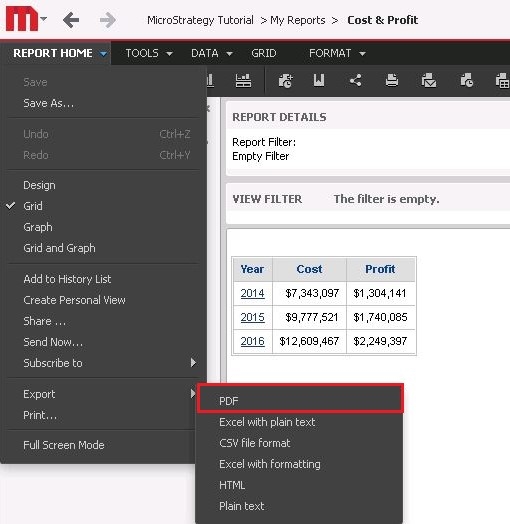
3) Export the saved report by going to “Report Home> Export > PDF”, as shown below:
4) Select exporting options in the next page.
5) Export the report to encounter the error message “Server Error in ‘/Strategy’ Application – System.Web.HttpException. A potentially dangerous Request.Path value was detected from the client”.

CAUSE:
This is a known issue in Strategy 10.4 Hotfix 4, when a user uses certain characters to name their report or document. Certain characters are considered XML escape characters and are handled and processed by the web server differently. Because the ampersand (&) is considered an XML escape character and is a special reserved character within XML, it is treated differently and not purely as a string character.
WORKAROUND:
Renaming the report or document without the special characters will resolve the issue; the defect has also been addressed in the version 10.4 hotfix 5 release.
ACTION:
This issue has been reviewed by Strategy and addressed in the version 10.4 hotfix 5 release. Please upgrade to take advantage of the fix.
KB438703
