PREREQUISITE:
Before starting with this article, it is assumed the user with the issue also has:
ISSUE:
Assuming the user has:
iserver1: tec-l-1183283
iserver2: tec-l-1183284
iserver3: tec-l-1183280
and the following host files in each of them:
Web server hosts file:
xxx.xxx.xxx.xx1 iserver1alias
xxx.xxx.xxx.xx2 tec-l-1183284.xxx.com tec-l-1183284
xxx.xxx.xxx.xx3 tec-l-1183280.xxx.com tec-l-1183280
iserver1 hosts file:
xxx.xxx.xxx.xx2 tec-l-1183284.xxx.com tec-l-1183284
xxx.xxx.xxx.xx3 tec-l-1183280.xxx.com tec-l-1183280
iserver2 hosts file:
xxx.xxx.xxx.xx1 iserver1alias
xxx.xxx.xxx.xx2 tec-l-1183284.xxx.com tec-l-1183284
xxx.xxx.xxx.xx3 tec-l-1183280.xxx.com tec-l-1183280
iserver3 hosts file:
xxx.xxx.xxx.xx1 iserver1alias
xxx.xxx.xxx.xx2 tec-l-1183284.xxx.com tec-l-1183284
xxx.xxx.xxx.xx3 tec-l-1183280.xxx.com tec-l-1183280
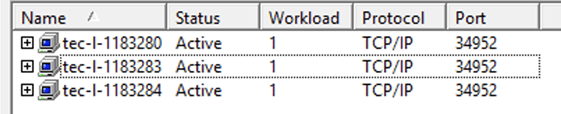
The user properly sets the cluster in developer to be:
And following that he sets in the Web admin page the alias he was looking forward to use, in this case “iserver1alias”:
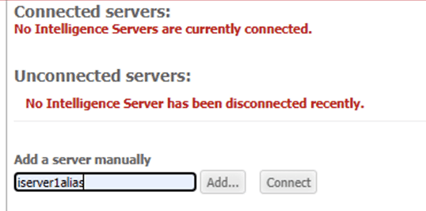

After some time or after a disconnection of that server the Servername of “ISERVER1ALIAS” is replaced with hostname TEC-L-1183283 automatically

ACTION:
In order to fix the above-mentioned behavior, please do the following:
WARNING: Until further notice the steps of this article will only work when user affinity is disabled. This is currently under investigation, please contact Strategy Technical Support for an update.
1) Go to Developer, leave I-server TEC-L-1183283 from cluster and then stop Strategy Intelligence Server on that one.
2) Add the Registry key "ServerName"="iserver1alias" on that one I-server (TEC-L-1183283)
Important: This name needs to be recognizable as a network machine. The DNS needs to recognize the entry as a machine and be able to resolve its IP address for any client machine access.
Note: Before implementing the steps below, remember to make sure that Strategy Intelligence Server is shutdown.
STEPS FOR WINDOWS:
Navigate to the location: HKEY_LOCAL_MACHINE\SOFTWARE\Wow6432Node\Strategy\DSS Server\Castor
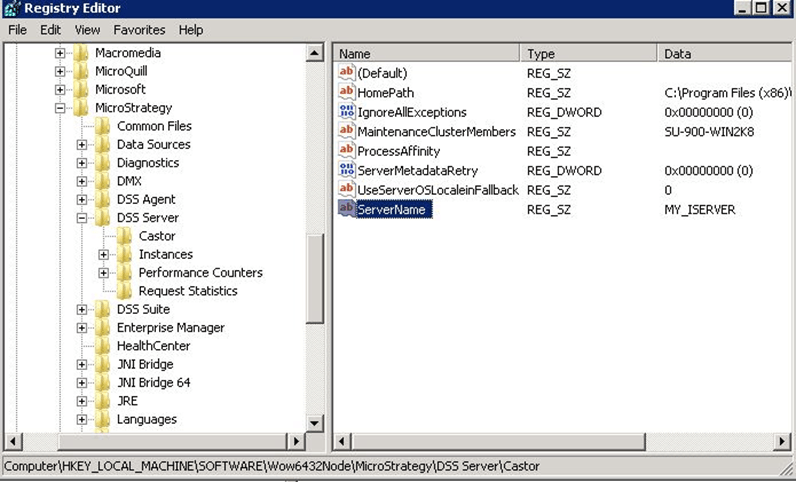
Registry Modification WARNING: Modifying registry values incorrectly may cause serious, system-wide problems that may require the re-installation of Microsoft Windows. Any edit of the registry is done at the user's own risk. Since these are user-initiated changes, they are not covered by any Strategy warranty. If using Microsoft Windows, the user should backup the registry and/ or update an Emergency Repair Disk prior to alterations.
STEPS FOR LINUX:
"ServerName"=<MY_ISERVER_ALIAS>
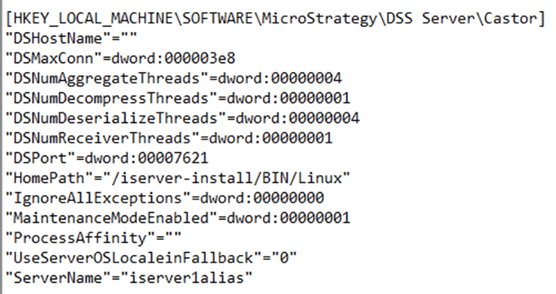
(Example img)
3) Start the I-server on that one machine TEC-L-1183283
4) Join that machine again to the cluster in developer:
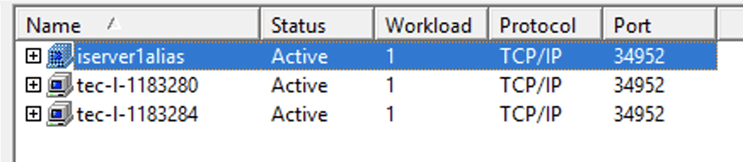
5) In Web admin page, Disconnect and then Connect TEC-L-1183280. Finally, the Server name of ISERVER1ALIAS remains as ISERVER1ALIAS and the alias is always used as server name in the Web Admin page.

