EducationSoftwareStrategy.com
StrategyCommunity

Knowledge Base

Product

Community

Knowledge Base

TopicsBrowse ArticlesDeveloper Zone

Product

Download SoftwareProduct DocumentationSecurity Hub

Education

Tutorial VideosSolution GalleryEducation courses

Community

GuidelinesGrandmastersEvents
x_social-icon_white.svglinkedin_social-icon_white.svg
Strategy logoCommunity

© Strategy Inc. All Rights Reserved.

LegalTerms of UsePrivacy Policy
  1. Home
  2. Topics

KB483531: When Opening Large Documents in MicroStrategy Web That Contain URL APIs, URL Manipulations Are Not Applied


Bo Hu

Software Architect • MicroStrategy


In MicroStrategy Web, if you open large documents using a URL API with multiple events and manipulations, the manipulations in the URL are not applied. This happens when it takes too long to execute a document and the Web server has not been told to hold onto the manipulations. This article provides a parameter you can add to the URL API to resolve the issue.

Description

In Strategy Web, if you open large documents using a URL API with multiple events and manipulations, the manipulations in the URL are not applied. This issue only occurs in large documents without a cache. Simple documents do not have this issue. Larger documents with a cache do not have this issue. A document is defined as large if the execution time is greater than the specified maximum wait time and a Wait dialog appears during execution.

Steps to Reproduce

Let's use passing group-by selections in a URL API as an example:
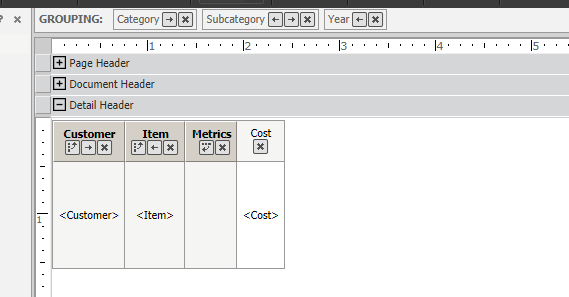
  • Open Strategy Web and create a dataset report.
  • Add Customer, Item, and Year in the rows.
  • Add a metric to the columns
  • Add the following attributes to the Grouping section:
    • Category
    • Subcategory
    • Year
  • Create a document based on the report you just created.
ka02R000000g17lQAA_0EM2R000000lbKr.jpeg
  • Create a URL to launch it with specific group-by selection similar to the one below for Tomcat:
    
    http://<server_name>:8080/MicroStrategy/servlet/mstrWeb?Server=<webserver_name>&Project=Strategy+Tutorial&Port=0&evt=2048001&src=mstrWeb.2048001&documentID=<document_ID>¤tViewMedia=1&visMode=0&src=mstrWeb.oivm.rwb.2048029&gbUnits=K6B23878B11E991B515C40080EFD57CC0%1fh1;8D679D3711D3E4981000E787EC6DE8A4%1fK6B24B02F11E991B515C40080EFD57CC0%1fh14;8D679D4F11D3E4981000E787EC6DE8A4%1fK6B24B73711E991B515C40080EFD57CC0%1fh2015;8D679D5111D3E4981000E787EC6DE8A4&evtorder=2048001%2c2048029&2048029=1&2048001=1

  • Clear the report and document caches.
  • Execute the URL twice. After the first execution, the Wait dialog appears and the group-by selection is not passed. Since there is no cache, the original selections still appear. After the second execution, the Wait dialog does not appear and the group-by selection is passed, since there is a cache.

Why is this happening?

When it takes a long time to execute a document, the manipulation events are lost if you do not tell the Web server to hold onto them.

Solution

Add the evtwait=true parameter to the URL API as shown below:


http://<server_name>:8080/MicroStrategy/servlet/mstrWeb?Server=<webserver_name>&Project=Strategy+Tutorial&Port=0&evt=2048001&src=mstrWeb.2048001&documentID=<document_ID>¤tViewMedia=1&visMode=0&src=mstrWeb.oivm.rwb.2048029&gbUnits=K6B23878B11E991B515C40080EFD57CC0%1fh1;8D679D3711D3E4981000E787EC6DE8A4%1fK6B24B02F11E991B515C40080EFD57CC0%1fh14;8D679D4F11D3E4981000E787EC6DE8A4%1fK6B24B73711E991B515C40080EFD57CC0%1fh2015;8D679D5111D3E4981000E787EC6DE8A4&evtorder=2048001%2c2048029&2048029=1&2048001=1&evtwait=true

By adding evtwait=true, the Web server forces events to wait on previous events. This allows the events to be processed one-by-one and none of them are lost.


Comment

0 comments

Details

Knowledge Article

Published:

August 7, 2019

Last Updated:

August 8, 2019