EducationSoftwareStrategy.com
StrategyCommunity

Knowledge Base

Product

Community

Knowledge Base

TopicsBrowse ArticlesDeveloper Zone

Product

Download SoftwareProduct DocumentationSecurity Hub

Education

Tutorial VideosSolution GalleryEducation courses

Community

GuidelinesGrandmastersEvents
x_social-icon_white.svglinkedin_social-icon_white.svg
Strategy logoCommunity

© Strategy Inc. All Rights Reserved.

LegalTerms of UsePrivacy Policy
  1. Home
  2. Topics

KB483773: In a document, when the graph width is small, the labels on the vertical ordinal axis overlap with other labels


Libing Wang

Software Engineer • MicroStrategy


This article explains how to resolve an issue where the graph width is small and as a result, the labels on the vertical ordinal axis overlap with other labels.

Description


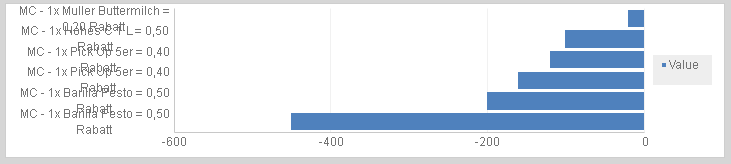
In a document, when a graph width is small, the labels on the vertical ordinal axis overlap with other labels.
ka02R000000bsc9QAA_0EM2R000000miCT.jpeg

Why is this happening?


Within a bar chart, the width of the bars in the chart are fixed. However, the labels formatting is controlled by a global parameter in the rendering engine that controls how the labels are displayed. If the the labels are long and contain many words, the rendering engine will break the label into two lines. 

Solution


Since the parameter that controls the label's formatting is a global parameter, you cannot configure the parameter in the graph style of each graph. Instead, if you want to change the label spacing, you can configure the parameter in the registry so the spacing applies to all document graphs.

ka02R000000bsc9QAA_0EM2R000000miFh.jpeg

Windows (x64)


To disable automatic wrapping on the vertical ordinal axis of a graph, download the attached registry file called

Build-in Parameters.reg
. Double-click the file to apply it to the registry.
To enable automatic wrapping again, you can manually modify the value of the registry item
WrapAllowedOnNormalLabels
from
0
to
1
.
You will need to restart the Intelligence Server for your changes to take affect.

Linux


To disable automatic wrapping on the vertical ordinal axis of a graph, first locate the

MSIReg.reg 
file. Typically, this is located in the directory where you installed the Intelligence Server, such as
/var/opt/MicroStrategy/
. Once you've found the file, change to its directory and run the following command:
echo "[HKEY_LOCAL_MACHINE\\SOFTWARE\\MicroStrategy\\Graphs\\Build-in Parameters]" >> MSIReg.regecho "\"WrapAllowedOnNormalLabels\"=dword:00000000" >> MSIReg.reg

To enable automatic wrapping again, you can manually modify the value of the registry item 
WrapAllowedOnNormalLabels
from
0
to
1 
in the
MSIReg.reg
file.
You will need to restart the Intelligence Server for your changes to take affect.
For other formatting changes you can make in the registry, see KB483772: In a document, labels on a graph appear staggered on two lines after upgrading to 2019 Update 3.


Comment

0 comments

Details

Knowledge Article

Published:

November 8, 2019

Last Updated:

June 5, 2020