EducationSoftwareStrategy.com
StrategyCommunity

Knowledge Base

Product

Community

Knowledge Base

TopicsBrowse ArticlesDeveloper Zone

Product

Download SoftwareProduct DocumentationSecurity Hub

Education

Tutorial VideosSolution GalleryEducation courses

Community

GuidelinesGrandmastersEvents
x_social-icon_white.svglinkedin_social-icon_white.svg
Strategy logoCommunity

© Strategy Inc. All Rights Reserved.

LegalTerms of UsePrivacy Policy
  1. Home
  2. Topics

KB485276: Incorrect User elements displayed for User group in an Ad-hoc Platform Analytics dossier in MicroStrategy 2021


Danfeng Zhan

Principal Product Specialist • Strategy


This issue has been classified as a defect by MicroStrategy. The impact is limited to MicroStrategy dossiers with attribute Metadata, User Group, and User in it. A workaround is available in the current document. A solution/code fix for this issue is not available in current releases but is being reviewed for a future MicroStrategy release.

Starting with the release of Strategy ONE (March 2024), dossiers are also known as dashboards.

SYMPTOM


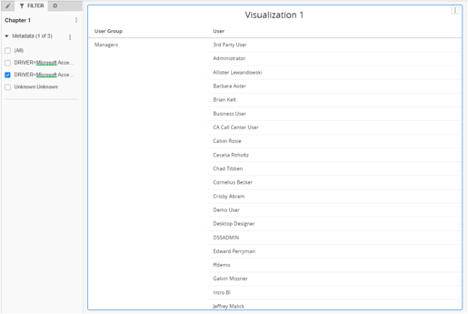
In Strategy 2021, incorrect User list is displayed when creating an ad-hoc dossier with attribute User and User group in a grid and checking some elements in attribute Metadata as dossier filter. 

STEPS TO REPRODUCE


1.    Create a new dossier, drag attribute User Group and User in the Visualization.
2.    Drag attribute Metadata into the chapter filter and check one of the elements.
3.    It shows more than 20 Users for User Group ‘Managers’.
ka0PW0000001JlxYAE_0EM4W000003AMAF.jpeg

4.    Correct data 17 Users show up only when checking all the elements in the Metadata chapter filter.

CAUSE


This is a known issue with Strategy 2021.

ACTION


This issue has been fixed in Strategy 2021 Update 5. Upgrade to this version to take advantage of the fix.

WORKAROUND


There is no direct relationship between metadata, User Group and User, the solution is to add a relationship between attribute Account and attribute Metadata since Account is the lowest Hierarchy in User Hierarchy. 
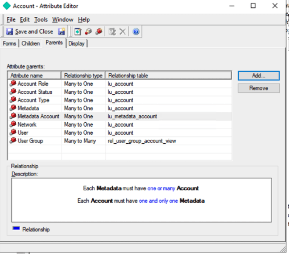
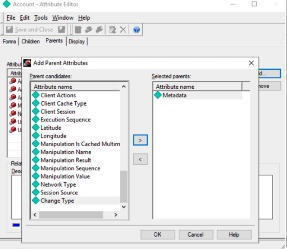
1.    From developer, edit attribute Account: and in Parent tab, add Metadata as its parent with Metadata to Account: 1 to Many relationships as shown below: 
ka0PW0000001JlxYAE_0EM4W000003AM5G.jpeg
ka0PW0000001JlxYAE_0EM4W000003AMAt.jpeg
ka0PW0000001JlxYAE_0EM4W000003AMAy.jpeg

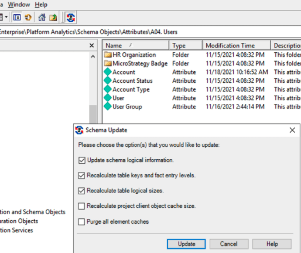
2.    Refresh schema, then we will have direct relationship between Metadata to Account->User or User Group.


Comment

0 comments

Details

Knowledge Article

Published:

December 2, 2021

Last Updated:

March 21, 2024