EducationSoftwareStrategy.com
StrategyCommunity

Knowledge Base

Product

Community

Knowledge Base

TopicsBrowse ArticlesDeveloper Zone

Product

Download SoftwareProduct DocumentationSecurity Hub

Education

Tutorial VideosSolution GalleryEducation courses

Community

GuidelinesGrandmastersEvents
x_social-icon_white.svglinkedin_social-icon_white.svg
Strategy logoCommunity

© Strategy Inc. All Rights Reserved.

LegalTerms of UsePrivacy Policy
  1. Home
  2. Topics

Incorrect display of numbers with thousands separator or currency formatting in RSD bar graphs in Mobile Android application in versions 2021 Update 7 – 2021 Update 9


Katarzyna Olszewska

Senior Cloud Support Engineer III • MicroStrategy


Steps to reproduce: 


  1. Create a document with one of the metrics with custom thousands separator formatting or using the “Currency” format. 
     

###,###,##0 "€" 
###,###,##0 
###.###.##0 
#,##0.00 "€" 
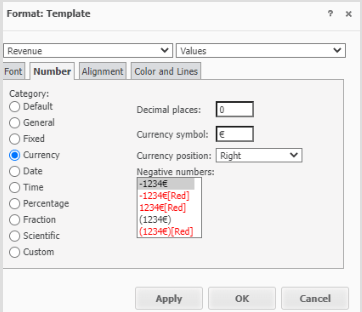
 

ka04W000001MKsMQAW_0EM4W000008KGRy.png


  1. Create a bar chart based on the metric. 
     
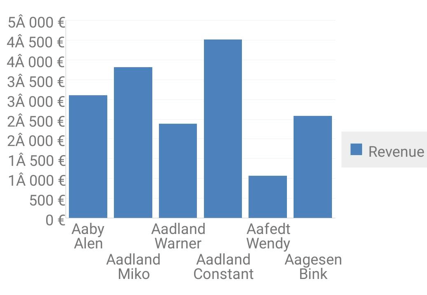
  1. Run the document using Strategy Mobile app for Android on a phone/tablet with either French or Polish language and notice the formatting is incorrect. Thousands separator gets replaced by a “” character. 


ka04W000001MKsMQAW_0EM4W000008KGRz.png


Workaround: 

A potential workaround is to use spaces/characters defined as a string as a separator, e.g. ###" "###" "##0 "€". 
 

Solution: 

This is an identified defect in Strategy Mobile. It has been fixed in version 2021 Update 10.  Please upgrade your Strategy Mobile app to take advantage of the fix.  


Comment

0 comments

Details

Knowledge Article

Published:

June 26, 2023

Last Updated:

June 26, 2023