EducationSoftwareStrategy.com
StrategyCommunity

Knowledge Base

Product

Community

Knowledge Base

TopicsBrowse ArticlesDeveloper Zone

Product

Download SoftwareProduct DocumentationSecurity Hub

Education

Tutorial VideosSolution GalleryEducation courses

Community

GuidelinesGrandmastersEvents
x_social-icon_white.svglinkedin_social-icon_white.svg
Strategy logoCommunity

© Strategy Inc. All Rights Reserved.

LegalTerms of UsePrivacy Policy
  1. Home
  2. Topics

KB485689: Increase the heap size for Java Exception: java.lang.OutOfMemoryError: Requested array size exceeds VM limit error.


Ramses Castro Cabrera

Senior Cloud Support Engineer II • MicroStrategy


The “Java Exception: java.lang.OutOfMemoryError: Requested array size exceeds VM limit” error is a memory leak error. If the garbage collector from Java does not free up enough memory, the performance of the Virtual Machine may seem affected, reaching its limit.

Symptom


When performing different actions in MSTR Web, an error like this listed may be displayed: 

"An exception occurred in the underlying search engine: Command SESuggesterGetSecureSuggestions; threw BaseException: A Java Exception: java.lang.OutOfMemoryError: Requested array size exceeds VM limit” 


Cause


The principal cause of this errors is a Memory Leak in Java code. In Java, a memory leak occurs when object references that are no longer needed are unnecessarily maintained. 
This error indicates that the application attempted to allocate an array that is larger than the heap size. For example, if an application attempts to allocate an array of 512MB but the maximum heap size is 256MB, then an Out of Memory will be thrown with this error message. In most cases, the problem is either a configuration issue or a bug that results when an application attempts to allocate a massive array. Therefore, the error is thrown when there’s insufficient space to request the array that exceeds the limits.
 

Action


To resolve this error, it will be necessary to modify the heap size. 
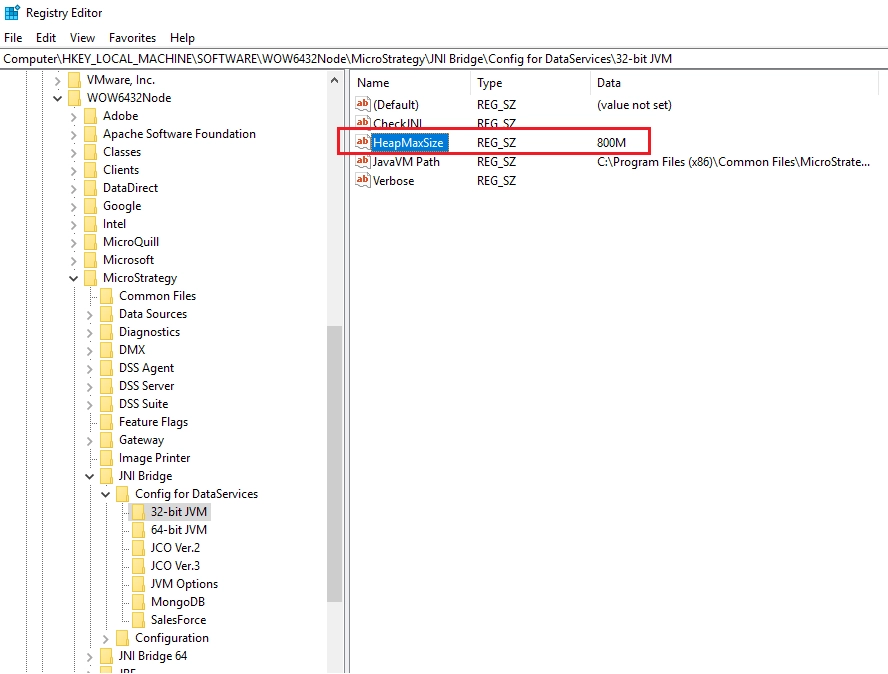
  1. Launch regedit.exe and navigate to the following path: 
  • For Windows: HKEY_LOCAL_MACHINE\SOFTWARE\WOW6432Node\MicroStrategy\JNI Bridge\Config for DataServices\32-bit JVM for Windows.
  • For Linux HKEY_LOCAL_MACHINE\SOFTWARE\WOW6432Node\MicroStrategy\JNI Bridge\Config for DataServices\64-bit JVM 
  1. Change the value of HeapMaxSize, please be aware that the number you place will have a suffix M for megabytes (500M = 500 MB). 
  2. Restart the Java Virtual Machine typing iisreset in Command Prompt (cmd.exe). 
ka04W000001Ix9rQAC_0EM4W000005nLGK.png

NOTE: Please be cautious when modifying the registry values. All the changes done in the registry are done considering the user environment characteristics and the manipulation is at user’s risk. We recommend performing a registry backup or an Emergency Disk Repair update before modifying the registry. Since these are user-initiated changes, they are not covered by any Strategy warranty.  


Comment

0 comments

Details

Knowledge Article

Published:

September 28, 2022

Last Updated:

September 28, 2022