EducationSoftwareStrategy.com
StrategyCommunity

Knowledge Base

Product

Community

Knowledge Base

TopicsBrowse ArticlesDeveloper Zone

Product

Download SoftwareProduct DocumentationSecurity Hub

Education

Tutorial VideosSolution GalleryEducation courses

Community

GuidelinesGrandmastersEvents
x_social-icon_white.svglinkedin_social-icon_white.svg
Strategy logoCommunity

© Strategy Inc. All Rights Reserved.

LegalTerms of UsePrivacy Policy
  1. Home
  2. Topics

Intermediate tables in MicroStrategy reports using Cassandra fail


Norman Matos

Associate Scrum Master • Strategy


This articles summarizes how to run a report with intermediate tables regardless of an observed failure.

Symptom:


Strategy reports that create intermediate tables fail with the following error
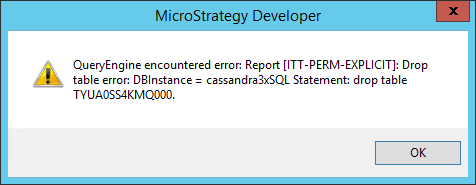
ka044000000kPBuAAM_0EM440000002MBV.png


Cause:


This occurs because the drop table statement is missing the table prefix specifying the keyspace name
Workaround:

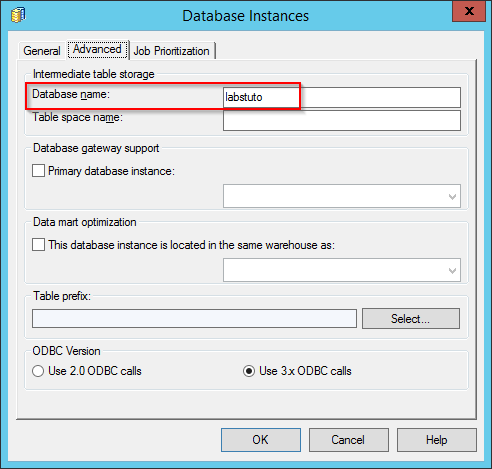
  1. Edit the Database Instance from Strategy Developer and navigate to the Advanced tab and add the Cassandra keyspace name to the Database name field
ka044000000kPBuAAM_0EM440000002MBa.png
  • When opening the affected Strategy report in SQL view mode you will see the table prefix being pushed down for intermediate table

create table labstuto.ZZMQ00 (
         month_id   DECIMAL,
         subcat_id  DECIMAL,
primary key (month_id, subcat_id))
 
 
insert into labstuto.ZZMQ00
select                 a12.month_id AS month_id,
         a13.subcat_id AS subcat_id
from order_detail                a11
         cross join  lu_month   a12
         join            lu_item      a13
           on            (a11.item_id = a13.item_id)
         join            lu_subcateg                a14
           on            (a13.subcat_id = a14.subcat_id)
where                 a14.category_id in (1)
group by             a12.month_id,
         a13.subcat_id
having                sum(a11.qty_sold) > 1500.0
 
select                 a12.subcat_id AS subcat_id,
         max(a14.subcat_desc) AS subcat_desc,
         a11.month_id AS month_id,
         max(a15.month_desc) AS month_desc,
         sum(a11.tot_dollar_sales) AS WJXBFS1
from item_mnth_sls           a11
         join            lu_item      a12
           on            (a11.item_id = a12.item_id)
         join            labstuto.ZZMQ00       pa13
           on            (a11.month_id = pa13.month_id and
         a12.subcat_id = pa13.subcat_id)
         join            lu_subcateg                a14
           on            (a12.subcat_id = a14.subcat_id)
         join            lu_month   a15
           on            (a11.month_id = a15.month_id)
where                 a14.category_id in (1)
group by             a12.subcat_id,
         a11.month_id
 
 
drop table labstuto.ZZMQ00

  1. You will now be able to run the report successfully


Comment

0 comments

Details

Knowledge Article

Published:

May 18, 2017

Last Updated:

May 18, 2017