SYMPTOM
It may happen to some users that when opening Strategy Office 10.10 or 10.11, the error : "Internal error: GetMSTROfficeString() - error formatting resource string MOZ_PRODUCT_NAME (Object reference not set to an instance of an object)" is displayed. The error disappear after clicking OK, and Strategy Office can be run normally. Although the the error doesn't have a consequence on the proper functionning of the software, it can be annoying
(demos, high management, ...). The error was seen in MicrStrategy office 10.4 HF5 and later 10.4 versions, 10.9, 10.10 and 10.11 as for now.
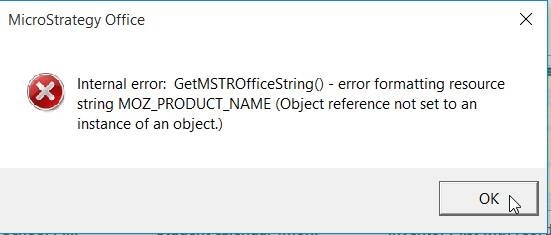
STEPS TO REPRODUCE :
CAUSE
This is an identified defect in several versions of Strategy. It is caused due to registry setting changes in the machine for one or various Microsoft office products. These registry setting changes may be changed due to an update on the machine. It is not system specific.
ACTION
At the time, our developers are working on a new Strategy Office product (https://community.strategy.com/article/Update-on-the-MicroStrategy-Office-Roadmap ) that should resolve a couple of defects the current plugin shows. Our developers' main goal is to ensure a better, simpler integration with Office 365. Upgrading to the newer product in the future will resolve these instabilities.
WORKAROUND
The workaround mentioned in KB439108 :
https://community.strategy.com/article/Internal-error-GetMSTROfficeString-error-formatting-resource-string-MOZ-PRODUCT-NAME-Object-reference-not-set-to-an-instance-of-an-object-appears-when-opening-Microsoft-Office-in-MicroStrategy-10-4-Hotfix-5-and-MicroStrategy-10-9?t=1538330650167
Will not likely remediate the issue, except in some rare cases.
The actual workaround is to use an older version of the plugin, such as the 10.4 GA plugin, where the error does not occur. You can use the older plugin to connect to newer versions of Strategy.
When using an older version of the plugin, you will get a pop up saying that a newer version of the plugin is available but you can disable the pop up using these instructions :
<add key="Refuse Upgrade" value="10.11.0051.0056" enable="1" override="1" />
So your maimain.dll.config looks similar to the following :
<?xml version="1.0"?>
<configuration>
<appSettings>
…
<add key="Refuse Upgrade" value="10.11.0051.0056" enable="1" override="1" />
</appSettings>
</configuration>
