EducationSoftwareStrategy.com
StrategyCommunity

Knowledge Base

Product

Community

Knowledge Base

TopicsBrowse ArticlesDeveloper Zone

Product

Download SoftwareProduct DocumentationSecurity Hub

Education

Tutorial VideosSolution GalleryEducation courses

Community

GuidelinesGrandmastersEvents
x_social-icon_white.svglinkedin_social-icon_white.svg
Strategy logoCommunity

© Strategy Inc. All Rights Reserved.

LegalTerms of UsePrivacy Policy
  1. Home
  2. Topics

Introducing MicroStrategy Geospatial Services


Community Admin

• Strategy


Introducing MicroStrategy's new and advanced mapping solution: MicroStrategy Geospatial Services

Starting with the release of Strategy ONE (March 2024), dossiers are also known as dashboards.

Description

Strategy is excited to announce the launch of Strategy Geospatial Services, an advanced mapping solution powered by Mapbox.
 
Strategy Geospatial Services takes our mapping capabilities a step further and covers twice as many use cases as our current out-of-the-box mapping solution. It is powered by Mapbox’s vector maps. Vector Maps are an advanced approach to mapping where all the features from the map are rendered faster and smoother, providing an exceptional user experience. When creating new dossiers or dashboards, users can now build beautiful map visualizations, analyze global location data, and perform advanced geospatial analysis in just a few clicks. 
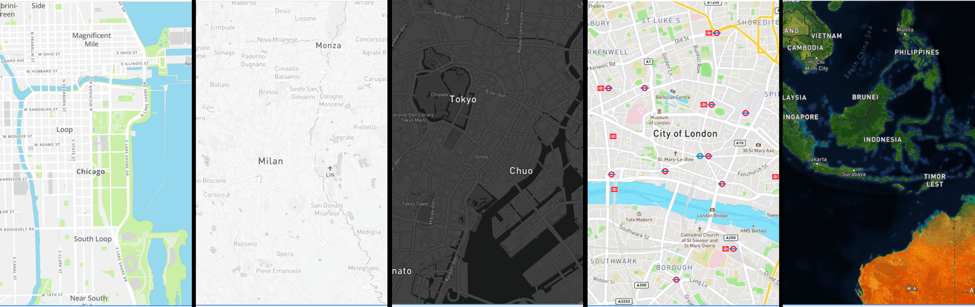
 

Select Capabilities of Strategy Geospatial Services


  1. Users are free to choose from 10 different base maps. This include include dark, white, and satellite base maps.


ka0PW0000001JYFYA2_0EM44000000A6vC.png


​

  1. Feel free to plot polygons, shape, or area maps for most countries in the world. You can plot down to the zip code or postal level.
  2. Plot data with confidence, resolve location name conflicts.


  1.  Use zoom to control the visibility of the different data layers on base map.
  2. Aggregate data into clusters, and specify the size of clusters and the zoom level for clustering.


  1. Use specific attributes and metrics to define color markers or area maps.


  1. The Geospatial Services feature is available as an add-on service with your Strategy server license. Geospatial Services is a feature available for dossiers on Strategy Desktop, Strategy Workstation, Strategy Web, and Strategy Library (mobile Library App included).

Get Started

  1. Download the 10.11 Strategy Desktop (download here). You can also download any version after 10.11.
  2. Geospatial Services is available out-of-the-box with Strategy Desktop.
  3. You can also upgrade to Strategy 10.11 or a later verision.
    • There is a trial version available to all Strategy customers, you will need a unique Geospatial Services key.
  4. Follow the steps here to generate a key and configure the Geospatial Services trial. If you still need help, reach out to Support.

Learning Resources

Interested in learning more about Dossier or Library?
Visit the Learning Center on Community for short video tutorials related to Dossier authoring and Library!


Comment

0 comments

Details

Knowledge Article

Published:

March 30, 2018

Last Updated:

March 21, 2024