EducationSoftwareStrategy.com
StrategyCommunity

Knowledge Base

Product

Community

Knowledge Base

TopicsBrowse ArticlesDeveloper Zone

Product

Download SoftwareProduct DocumentationSecurity Hub

Education

Tutorial VideosSolution GalleryEducation courses

Community

GuidelinesGrandmastersEvents
x_social-icon_white.svglinkedin_social-icon_white.svg
Strategy logoCommunity

© Strategy Inc. All Rights Reserved.

LegalTerms of UsePrivacy Policy
  1. Home
  2. Topics

KB486168: "Invalid CFBundleSupportedPlatforms value" error when uploading a customized mobile app to Apple Store


Alejandro Olvera Velasco

Product Manager, Principal • MicroStrategy


When using the MicroStrategy Mobile iOS or Library iOS SDK to create a customized mobile app, an error saying "Invalid CFBundleSupportedPlatforms value" occurs when attempting to upload it to the App Store

Symptom:
If you create your customized mobile app using Strategy Mobile SDK for iOS (version 2021) or Strategy Library SDK for iOS (version 2021) and try to upload it to apple store, an error may occur:
Invalid CFBundleSupportedPlatforms value. The CFBundleSupportedPlatforms key in the Info.plist file in 'Payload/Library.app/StrategyMobileSDKResources.bundle' bundle contains an invalid value [iPhoneSimulator]. Consider removing the CFBundleSupportedPlatforms key from the Info.plist file. If this bundle is part of a third-party framework, consider contacting the developer of the framework for an update to address this issue.

ka04W000000rZMqQAM_0EM4W0000091IbS.jpeg

Cause:
This is a known issue in the Strategy Mobile SDK bundle.
Solution:
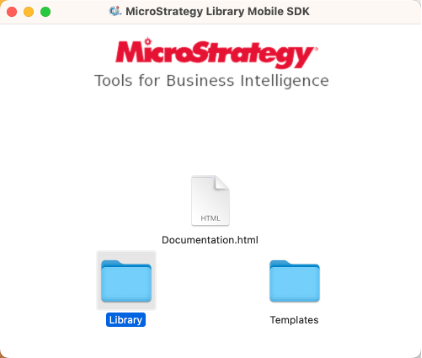
  • Open the DMG file, copy all the folders to your local drive.
ka04W000000rZMqQAM_0EM4W0000091IYo.jpeg
  • Open iOS project in Xcode.
    • iOS Library SDK: Open the Templates/Template folder that you extracted from the DMG and double-click StrategyLibrary.xcodeproj.
    • iOS Mobile SDK:  Open the  StrategyMobile folder that you extracted from the DMG and double-click StrategyMobile.xcodeproj
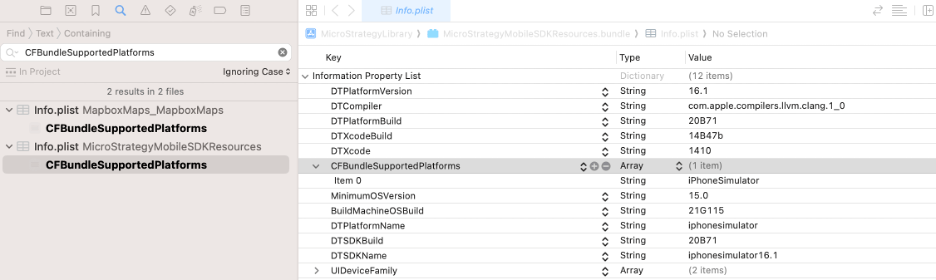
  • Search ‘CFBundleSupportedPlatforms’ in Xcode search panel.
  • Open the info.plist of StrategyMobileSDKResources.bundle.
ka04W000000rZMqQAM_0EM4W0000091IbX.jpeg
  • Now the value of “CFBundleSupportedPlatforms”  is ‘iPhoneSimulator’. Modify it to “iPhoneOS”.
  • Two other keys are also recommended to be updated:
    • DTPlatformName - iphoneos
    • DTSDKName - iphoneos16.1
ka04W000000rZMqQAM_0EM4W0000091Ibh.jpeg
  • Compile your mobile build and upload to App Store again.


Comment

0 comments

Details

Knowledge Article

Published:

October 12, 2023

Last Updated:

January 11, 2024