EducationSoftwareStrategy.com
StrategyCommunity

Knowledge Base

Product

Community

Knowledge Base

TopicsBrowse ArticlesDeveloper Zone

Product

Download SoftwareProduct DocumentationSecurity Hub

Education

Tutorial VideosSolution GalleryEducation courses

Community

GuidelinesGrandmastersEvents
x_social-icon_white.svglinkedin_social-icon_white.svg
Strategy logoCommunity

© Strategy Inc. All Rights Reserved.

LegalTerms of UsePrivacy Policy
  1. Home
  2. Topics

KB485344: "Invalid Port Number" error occurs while configuring the Intelligence server


Katarzyna Panek

Quality Engineer • Strategy


This article provides steps for addressing the error that occurs during Intelligence server configuration in the Configuration Wizard.

Description


When configuring the Intelligence server via the Configuration Wizard, the following error appears: 
[ERROR] Invalid Port Number: The port 34952 you specified is in use, please use another one. 

Solution

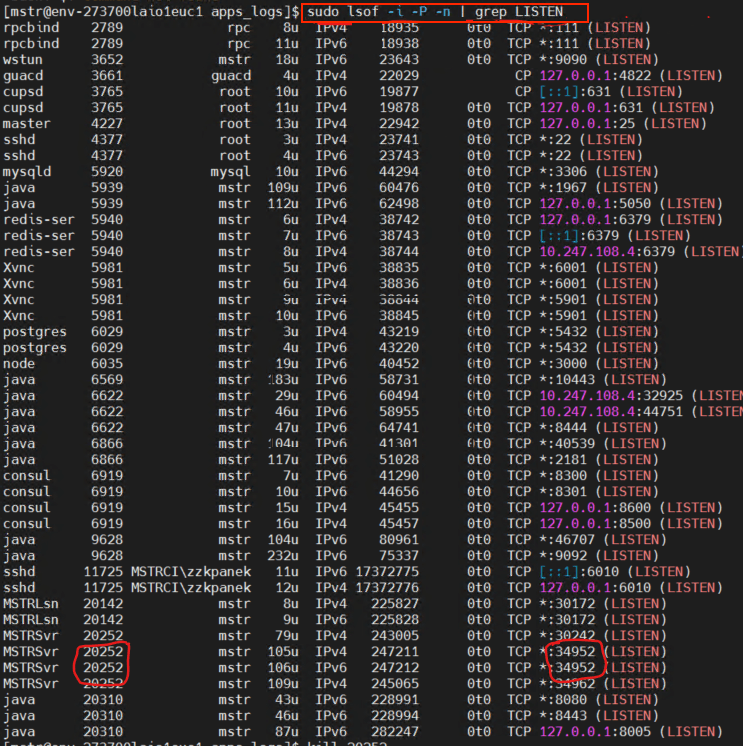
  • Check which processes occupy which ports using the following command: 
    
    sudo lsof -i -P -n | grep LISTEN
    

    In the following example, the
    MSTRSvr 20252
    process occupies the
    34952
    port. 
ka04W000001Iu8PQAS_0EM4W000004XkVG.jpeg
  • To use the port (for example,
    34952
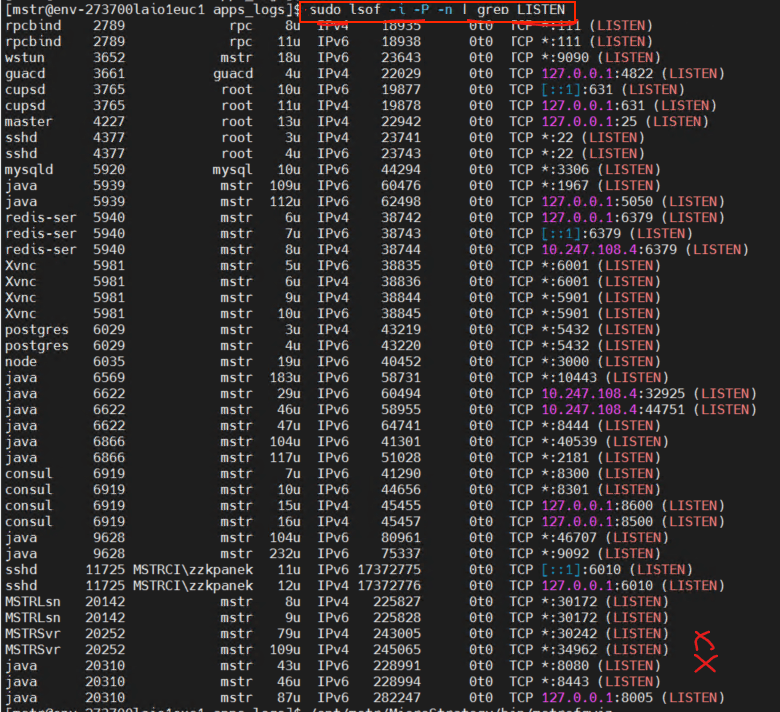
    ) while configuring the Intelligence server, kill the process using the command:
    
    kill <process number>

    In this case, it is: 
    
    kill 20252

  • Check if the processes were killed for the given port. 
ka04W000001Iu8PQAS_0EM4W000004XkW9.jpeg
  • Continue with configuring the Intelligence server.

Comment

0 comments

Details

Knowledge Article

Published:

January 28, 2022

Last Updated:

January 28, 2022