EducationSoftwareStrategy.com
StrategyCommunity

Knowledge Base

Product

Community

Knowledge Base

TopicsBrowse ArticlesDeveloper Zone

Product

Download SoftwareProduct DocumentationSecurity Hub

Education

Tutorial VideosSolution GalleryEducation courses

Community

GuidelinesGrandmastersEvents
x_social-icon_white.svglinkedin_social-icon_white.svg
Strategy logoCommunity

© Strategy Inc. All Rights Reserved.

LegalTerms of UsePrivacy Policy
  1. Home
  2. Topics

KB485208: Issues with importing Windows Authentication users in MicroStrategy 2021


Rafal Uchryn

Systems Engineer • MicroStrategy


This article addresses the login error that occurs when a user is linked to Windows Authentication. This article also provides a solution and workaround to avoid this error.

Description


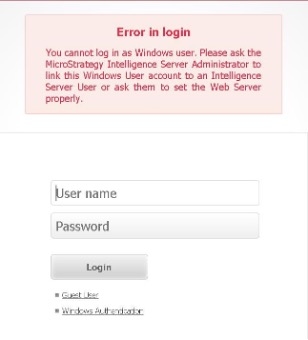
The following error is returned when logging in with a user linked to Windows Authentication. 
You cannot log in as Windows user. Please ask the Strategy Intelligence Server Administrator to link the Windows User account to an Intelligence Server User or ask them to set the Web Server property. 
 

ka04W000001Is97QAC_0EM4W00000391O0.jpeg


The following error can also be found in the Authentication Trace:
YYYY-MM-DD HH:MM:SS [HOST:host1][SERVER:CastorServer][PID:3100][THR:15684][Authentication Server][Error][UID:0][SID:0][OID:0][CDSSAuthServer.cpp:19696] Login failed using authentication mode = 'NT' with User = '0123123453BA09123123’ from client = 'Server Machine: XXX.XX.XXX.XX’ Client Machine: tempclient' with client type ='DSSWeb' because no MSTR user Linked.
YYYY-MM-DD HH:MM:SS [HOST:host1][SERVER:CastorServer][PID:3100][THR:13700][Authentication Server][Error][UID:0][SID:0][OID:0][CDSSAuthServer.cpp:19696] Login failed using authentication mode = 'Standard' with User = '' from client = 'Server Machine: Client Machine: XXX.XX.XXX.XX' with client type ='DSSWeb' because No User was input.
 

Why is this happening?


The issue with importing Windows users at login has been discovered in Strategy 2021 Update 1 and Update 2. 

Solution


This issue has been addressed and fixed in Strategy 2021 Update 3. Please upgrade to take advantage of this fix. 

Workaround

  1. Disable the "Synchronize user/group information with LDAP during Windows authentication and import Windows link option during Batch Import" option in LDAP-Import-Options in the Intelligence Server Configuration. 
  2. Use Command Manager to import users with a Windows link. 


Comment

0 comments

Details

Knowledge Article

Published:

October 12, 2021

Last Updated:

October 12, 2021