MicroStrategy 10.4 Hotfix 5 provides parity with MicroStrategy feature release 10.9. for some features
The information below provides a summary table of the functional and driver updates, the steps required to enable them, and a table with the full list of Gateway changes.
The following functional and driver updates on Windows and Linux
Gateway | Driver | Connector | Links to more information |
|---|---|---|---|
Amazon Athena | N/A | Introduces support for Athena | Enable importing prefix with tables |
| Follow these steps when retrieving large data volumes | |||
Amazon Aurora | N/A | Introduces support for Aurora | Create or modify connections to Aurora in Developer |
Apache Hive | Updated | Adds support for Hive 2 |
|
Apache Spark SQL | Updated | Adds support for Spark SQL 2 | Enable importing prefix with tables |
Cassandra | ODBC driver added | Introduces support for Cassandra 3 |
|
Google BigQuery | updated | Updates the connector | On Linux, post-install steps are required to enable driver |
| Enable importing prefix with tables | |||
IBM DB2 | updated | Adds support for DB2 11 |
|
MapR Drill | updated | Adds support for Drill 1.10 | In Web, modify the query syntax when using "Build a Query" |
MariaDB | N/A | Adds support for MariaDB 10 | Create or modify connections to MariaDB in Developer |
Microsoft SQL Server | updated | Adds support for SQL Server 2016 |
|
Microsoft Azure SQL Database | updated | Updates connector |
|
MongoDB | ODBC driver added | Updates the connector to support MongoDB 3 |
|
Oracle Database | updated | Adds support for Oracle 12 R2 |
|
Presto | updated | Updates existing connector for Presto | Follow these steps when retrieving large data volumes |
SAP HANA | N/A | Adds support for SAP HANA 2 | Data Import only supports Information Views |
Teradata | N/A | Adds support for Teradata 16 |
|
- Existing DSNs and connections are tested and expected to work.Existing connectors have not yet been updated.
- Existing applications are expected to continue working in the same way as before the upgrade, no SQL changes are expected.
- This allows for a risk free upgrade to Hotfix 5.New connectors have not yet been added and will not appear in Developer.
See KB43537 for detailed steps explaining how to load the database object in the database.pds file into MicroStrategy metadata.
Example: How to add the DB object for Teradata 16
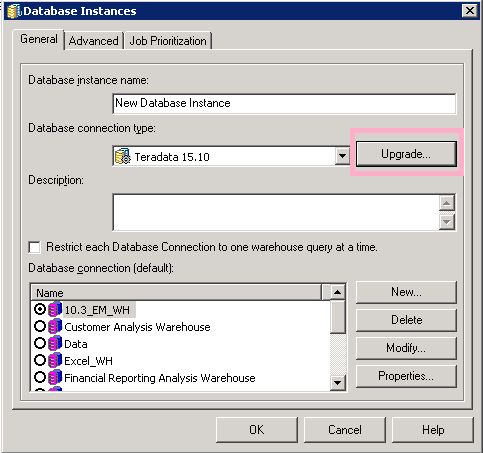
When the “Upgrade Database Type” window appears, click load, then locate “Teradata 16.0”, and click add to the right.
.png&w=3840&q=100)
3.Click Ok to save.
4.Click Ok on the Database instance window too. Reopen the Database instance GUI, the Teradata 16.0 is available from the drop-down window.
.png&w=3840&q=100)
