EducationSoftwareStrategy.com
StrategyCommunity

Knowledge Base

Product

Community

Knowledge Base

TopicsBrowse ArticlesDeveloper Zone

Product

Download SoftwareProduct DocumentationSecurity Hub

Education

Tutorial VideosSolution GalleryEducation courses

Community

GuidelinesGrandmastersEvents
x_social-icon_white.svglinkedin_social-icon_white.svg
Strategy logoCommunity

© Strategy Inc. All Rights Reserved.

LegalTerms of UsePrivacy Policy
  1. Home
  2. Topics
  3. KB10007: Multiple rows are displayed for a single attribute element at the report level when a lower-level metric is included on the template in MicroStrategy.

KB10007: Multiple rows are displayed for a single attribute element at the report level when a lower-level metric is included on the template in MicroStrategy.


Stefan Zepeda

Salesforce Solutions Architect • Strategy


Multiple rows are displayed for a single attribute element at the report level when a lower-level metric is included on the template in MicroStrategy.
SYMPTOM:Using the MicroStrategy Tutorial project to reproduce this issue, create a report as follows: 
  • Metric: Count(Customer) {~} -- this metric exists out-of-the-box as Count of Customers
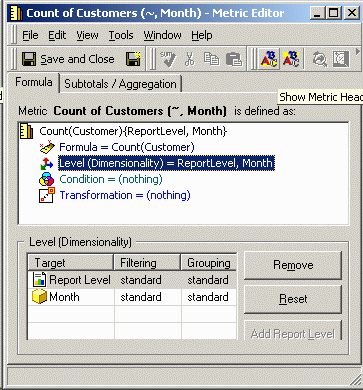
  • Metric: Count(Customer) {~, Month}
ka04W000000OhTtQAK_0EM440000002FxT.gif

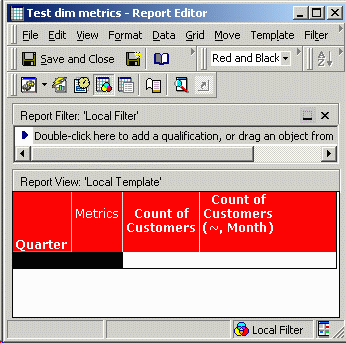
Report: Quarter, Count of Customers, Count of Customers (month level):
ka04W000000OhTtQAK_0EM440000002Fxb.gif

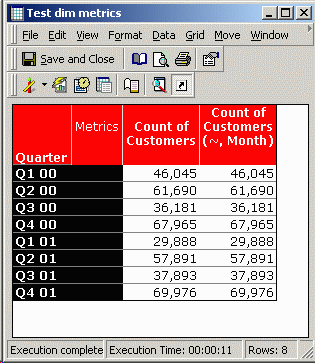
Executing this report yields the following unexpected result:
ka04W000000OhTtQAK_0EM440000002FxP.gif
Not only are there three rows for every quarter, the monthly values do not add up to the quarterly values (18,905 + 18,905 +18,905 = 52,715, not 46,045).


Executing the report SQL directly against the warehouse yields the following, more logical, results:


QUARTER_ID

QUARTER_DESC

WJXBFS1

WJXBFS2

20001

Q1 00

46045

12845

20001

Q1 00

46045

14295

20001

Q1 00

46045

18905

20002

Q2 00

61690

18354

20002

Q2 00

61690

21516

20002

Q2 00

61690

21820

20003

Q3 00

36181

8331

20003

Q3 00

36181

12539

20003

Q3 00

36181

15311

20004

Q4 00

67965

13758

20004

Q4 00

67965

20160

20004

Q4 00

67965

34047

20011

Q1 01

29888

8401

20011

Q1 01

29888

9009

20011

Q1 01

29888

12478

20012

Q2 01

57891

15551

20012

Q2 01

57891

20940

20012

Q2 01

57891

21400

20013

Q3 01

37893

9387

20013

Q3 01

37893

12563

20013

Q3 01

37893

15943

20014

Q4 01

69976

15054

20014

Q4 01

69976

22800

20014

Q4 01

69976

32122

Here, the monthly values add up (12,845 + 14,295 + 18,905 = 46,045). Note that the value repeated in the MicroStrategy report is the largest value of the monthly metric for each quarter.


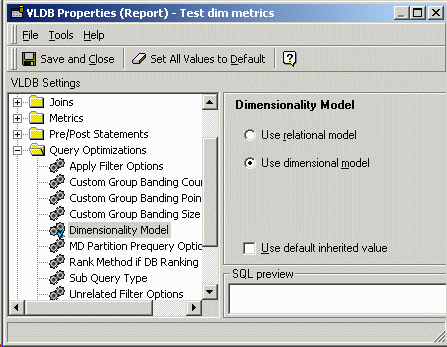
CAUSE:If the VLDB property "Dimensionality model" is set to "Use dimensional model," the report will behave in this way. In the dimensional model, metrics calculated at a level lower than the report level will be calculated exactly as defined, producing the unusual results shown above.


In the VLDB property editor, go into the Tools menu and select "Show Advanced Settings" for this property to be visible, as shown below:
ka04W000000OhTtQAK_0EM440000002Fxf.gif
The dimensional model is included for backward compatibility with MicroStrategy 6.x. In MicroStrategy 7i, new methods were introduced to evaluate the calculation level of metrics which prevent the incorrect result demonstrated in this document. For new installations of MicroStrategy 8.x, "Use relational model" is selected by default. In general, there should not be any need to change this setting.
  • Further information on when the dimensional model should be used may be found in the MicroStrategy documentation: Admin.pdf > VLDB Settings > VLDB properties > Query Optimizations > Dimensionality Model.
The report SQL shows that the first metric is calculated at the level of Quarter (report level), while the second metric is at the level of Month, as specified in the metric definition. When these results are joined, there will be one row in the final result for each month. However, the month ID is not selected because Month is not on the template.


Dimensional model SQL

Relational model SQL

select a14.QUARTER_ID QUARTER_ID,
   count(a12.CUSTOMER_ID) WJXBFS1
into #ZZMD00
from LU_ORDER a12
   join ORDER_DETAIL a13
     on (a12.order_id = a13.order_id)
   join LU_DAY a14
     on (a13.ORDER_DATE = a14.DAY_DATE)
group by a14.QUARTER_ID
select a14.MONTH_ID MONTH_ID,
   count(a12.CUSTOMER_ID) WJXBFS1
into #ZZMD01
from LU_ORDER a12
   join ORDER_DETAIL a13
     on (a12.order_id = a13.order_id)
   join LU_DAY a14
     on (a13.ORDER_DATE = a14.DAY_DATE)
group by a14.MONTH_ID
select distinct pa1.QUARTER_ID QUARTER_ID,
   a12.QUARTER_DESC QUARTER_DESC,
   pa1.WJXBFS1 WJXBFS1,
   pa2.WJXBFS1 WJXBFS2
from #ZZMD01 pa2
   join LU_MONTH a11
     on (pa2.MONTH_ID = a11.MONTH_ID)
   join #ZZMD00 pa1
     on (a11.QUARTER_ID = pa1.QUARTER_ID)
   join LU_QUARTER a12
     on (pa1.QUARTER_ID = a12.QUARTER_ID)
drop table #ZZMD00
drop table #ZZMD01

    select   a14.QUARTER_ID QUARTER_ID,
       count(a12.CUSTOMER_ID) WJXBFS1
    into #ZZMD00
    from   LU_ORDER   a12
       join   ORDER_DETAIL   a13
         on    (a12.order_id = a13.order_id)
       join   LU_DAY   a14
         on    (a13.ORDER_DATE = a14.DAY_DATE)
    group by   a14.QUARTER_ID
    select   a14.QUARTER_ID QUARTER_ID,
       count(a12.CUSTOMER_ID) WJXBFS1
    into #ZZMD01
    from   LU_ORDER   a12
       join   ORDER_DETAIL   a13
         on    (a12.order_id = a13.order_id)
       join   LU_DAY   a14
         on    (a13.ORDER_DATE = a14.DAY_DATE)
    group by   a14.QUARTER_ID
    select   pa1.QUARTER_ID QUARTER_ID,
       a11.QUARTER_DESC QUARTER_DESC,
       pa1.WJXBFS1 WJXBFS1,
       pa2.WJXBFS1 WJXBFS2
    from   #ZZMD00   pa1
       join   #ZZMD01   pa2
         on    (pa1.QUARTER_ID = pa2.QUARTER_ID)
       join   LU_QUARTER   a11
         on    (pa1.QUARTER_ID = a11.QUARTER_ID)
    drop table #ZZMD00
    drop table #ZZMD01


      When MicroStrategy formats the report for display, it expects that the attribute keys in the final result pass will be unique. When it finds multiple rows with the same attribute keys, it resolves the conflict by selecting the largest value of metrics with different values and replicating them across all the rows sharing a common key.


      When "Use relational model" is chosen for the Dimensionality model VLDB property, the month-level metric's level will be calculated instead at Quarter level, because Quarter is the lowest level attribute in the time hierarchy present on the report. In this scenario, the results will appear as follows:
      ka04W000000OhTtQAK_0EM440000002FxP.gif
      ACTION:Change the "Dimensionality model" VLDB property to "Use relational model."


      Alternately, if it is required to display both monthly and quarterly data, ensure that the 'Month' attribute (the child attribute) is also on the template.

      Comment

      0 comments

      Details

      Knowledge Article

      Published:

      June 14, 2023

      Last Updated:

      January 31, 2024