EducationSoftwareStrategy.com
StrategyCommunity

Knowledge Base

Product

Community

Knowledge Base

TopicsBrowse ArticlesDeveloper Zone

Product

Download SoftwareProduct DocumentationSecurity Hub

Education

Tutorial VideosSolution GalleryEducation courses

Community

GuidelinesGrandmastersEvents
x_social-icon_white.svglinkedin_social-icon_white.svg
Strategy logoCommunity

© Strategy Inc. All Rights Reserved.

LegalTerms of UsePrivacy Policy
  1. Home
  2. Topics

KB10033: Function not available in DBMS error message appears when a comparison operator prompt is used within an OLAP function in a metric definition in MicroStrategy


Stefan Zepeda

Salesforce Solutions Architect • Strategy


This article notes a limitation of object prompts containing operators

SYMPTOM:
 
When an object prompt for a comparison operator is used in an OLAP function, the following error appears:
Function not available in DBMS.
The following steps reproduce this error:

  • Create the following metrics:
    M1 = Sum([Revenue])
    M2 = Sum([Cost])
  • Create the object prompt named "Operator" with comparison functions that can be used for comparisons:
ka02R000000kVrvQAE_0EM440000002FxB.gif
  • Create the following metric using the object prompt, "Operator". Drag and drop "Operator" into the metric definition and enter the remaining ones:
    M3 = @Operator([M1], [M2])
  • Create the metric using an ApplySimple function and Case with the metric M3:
    M4 = ApplySimple("Case when #0 THEN 1 ELSE 0 END ", [M3])
  • Create the metric using a MovingDifference function which is in OLAP functions:
    M5 = MovingDifference <SortBy=(Day)>([M4], 2)
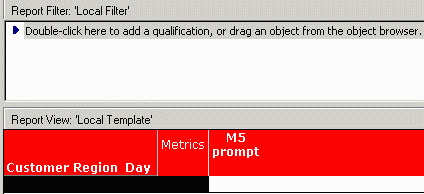
  • Create the following report with attributes, 'Customer' 'Region', 'Day' and metric, M5, as shown below:
ka02R000000kVrvQAE_0EM440000002Fwx.gif

The report fails with the following error:
 

ka02R000000kVrvQAE_0EM440000002Fx0.gif

 
Function not available in DBMS
Error in process method of Component: QueryEngineServer, Project X, Job XXX, Error Code: -2147212287
 
CAUSE:
 
This issue occurs because the object prompt for comparison operators does not work in OLAP functions.
 
WORKAROUND:
 
Instead of using the object prompt for a comparison operator, use object prompts for metrics. To achieve this, perform the following steps:

  • Create metrics with all comparison operators:
    M4-1 = ApplySimple(" Case when #0 > #1 then 1 else 0 end", [M1], [M2] )
    M4-2 = ApplySimple(" Case when #0 < #1 then 1 else 0 end", [M1], [M2] )
    M4-3 = ApplySimple(" Case when #0 <> #1 then 1 else 0 end", [M1], [M2] )
    M4-4 = ApplySimple(" Case when #0 >= #1 then 1 else 0 end", [M1], [M2] )
    M4-5 = ApplySimple(" Case when #0 =< #1 then 1 else 0 end", [M1], [M2] )
  • Create metrics with OLAP functions and the above metrics:
    M5-1 = MovingDifference <SortBy=(Date)> ([M4-1], 2)
    M5-2 = MovingDifference <SortBy=(Date)> ([M4-2], 2)
    M5-3 = MovingDifference <SortBy=(Date)> ([M4-3], 2)
    M5-4 = MovingDifference <SortBy=(Date)> ([M4-4], 2)
    M5-5 = MovingDifference <SortBy=(Date)> ([M4-5], 2)
  • Create an object prompt with the metrics above, as shown below:
ka02R000000kVrvQAE_0EM440000002Fwy.gif
  • Create a report with the object prompt with the metrics.

It should now return without error:
 

ka02R000000kVrvQAE_0EM440000002FxA.gif


Comment

0 comments

Details

Knowledge Article

Published:

May 19, 2017

Last Updated:

May 19, 2017