SYMPTOM:
Users want to display a list of attribute elements and rank them based on a metric. Some of the elements may have no records in the fact table and the metric does not return any value, but the user still wants these elements displayed in the report and evaluated by the rank function.
Consider the following example using the Strategy Tutorial project:
A user wants to display the bottom 7 countries in terms of their Revenue. The report has 'Country' attribute, 'Revenue' metric, and a set qualification filter to return the Bottom 7 countries.
The user first creates a simple report with 'Country' and 'Revenue', as shown below:

However, the user is aware that more than two countries are listed in the lookup table for the 'Country' attribute. The user decides to enable outer join to the lookup table by adding another attribute to the template as described in the following Strategy Knowledge Base document:
The report results are as below:

The 'Revenue' metric does not return any value - not even a null value - for England, France, Germany and Canada. (Spain is not listed on this report because it does not have a Region.) The empty values for 'Revenue' displayed on the report represent the result of the outer join between the temp tables.
When the Revenue qualification to rank bottom 7 countries is added to the report, the following result set is returned:

The ranking function ignores the countries with no value for the 'Revenue' metric. Moreover, the ranking is performed against the 'Region' rather than 'Country', regardless of the Output Level.
CAUSE:
This behavior occurs because ranking cannot be performed on the null values that are the result of an outer join.
WORKAROUNDS:
EXAMPLE:
The 'Revenue' metric can be modified in the following manner:

(Sum(Revenue){~} + (0*Count(Country){~}))
The Count metric ensures that the lookup table for the 'Country' is hit in the calculation of the Revenue. The 'Count' function has the following parameters:
Ideally, the Count function should return a value of one for each country in the lookup table. Multiplying this value by zero ensures that the original metric calculation is not adversely affected.
NOTE:
It is important that the Formula Join Type for the Revenue metric is set to Outer.
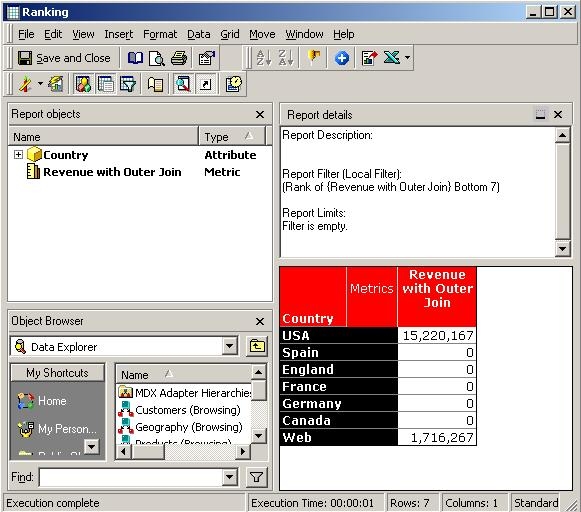
Once the 'Revenue' metric is modified, the user may create a report with 'Country' and 'Revenue' on the template and the metric qualification to rank the Bottom 7 countries by 'Revenue':
NOTE:
This workaround may not work correctly in certain circumstances where Break By feature of Ranking is used.
