SYMPTOM:
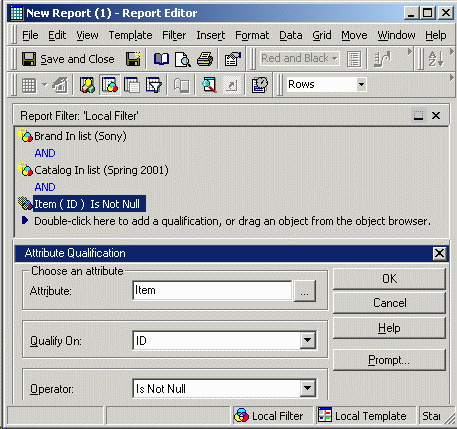
In the Strategy Tutorial project, a user wishes to see the total revenue for Sony products that were listed in the Spring 2001 catalog. The user creates a new report as follows:
Note: This report will return no results in Strategy Tutorial because the relationship table between Item and Catalog is empty.
Examining the report Structured Query Language (SQL), the user observes that the query will actually return the revenue for all Sony products, not only those products that were listed in the Spring 2001 catalog:
select a12.BRAND_ID BRAND_ID,
max(a13.BRAND_DESC) BRAND_DESC,
sum(a11.TOT_DOLLAR_SALES) WJXBFS1
from ITEM_MNTH_SLS a11
join LU_ITEM a12
on (a11.ITEM_ID = a12.ITEM_ID)
join LU_BRAND a13
on (a12.BRAND_ID = a13.BRAND_ID)
where (((a12.BRAND_ID)
in (select c22.BRAND_ID
from REL_CAT_ITEM c21
join LU_ITEM c22
on (c21.ITEM_ID = c22.ITEM_ID)
where c21.CAT_ID in (5)))
and a12.BRAND_ID in (215))
group by a12.BRAND_ID
The subquery, shown in boldface, identifies all the brands that had an item in the specified catalog. The main query then sums the total dollar sales for all the items belonging to the Sony brand (if that brand was in the catalog).
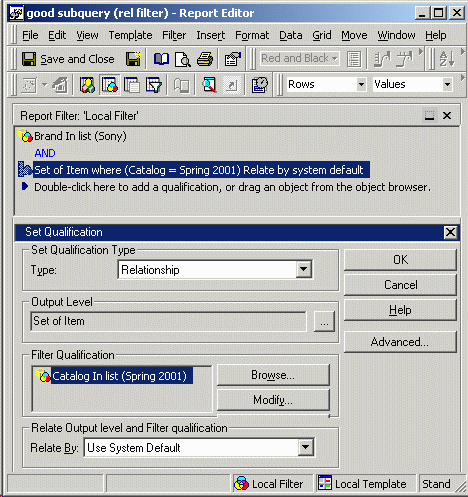
To obtain the desired results, the subquery should be evaluated at Item level, not Brand level.
CAUSE:
The attributes on the template combined with the attributes in the report filter are all at a higher level than Item. The report level is (Brand, Catalog). The Strategy Engine is designed to evaluate filters at report level unless otherwise specified.
When set qualifications are used (metric or relationship filters), users can define the output level of the set to be a user-selected set of attributes (or, in the case of metric qualifications, the default metric level or report level). The qualification here is an attribute qualification; thus, the user does not have a chance to specify the output level.
ACTION:
Two possible resolutions are available: